|
|
[![release][Release Badge]][Release Page]
|
|
|
[![license MIT][License Badge]][License Page]
|
|
|
|
|
|
[![integrated in PlantUML][Integrated Badge]][Integrated Page]
|
|
|
|
|
|
[![commits since][Commits Since Badge]][Commit Page]
|
|
|
|
|
|
[Release Badge]: https://img.shields.io/badge/release-v2.10.0-blue
|
|
|
[Release Page]: https://github.com/plantuml-stdlib/C4-PlantUML/releases/v2.10.0
|
|
|
[License Badge]: https://img.shields.io/github/license/plantuml-stdlib/C4-PlantUML
|
|
|
[License Page]: https://github.com/plantuml-stdlib/C4-PlantUML/blob/master/LICENSE
|
|
|
[Integrated Badge]: https://img.shields.io/badge/C4--PlantUML%20%20v2.10.0%20integrated%20in%20PlantUML%20Standard%20Library-V1.2024.6-orange
|
|
|
[Integrated Page]: https://plantuml.com/stdlib#062f75176513a666
|
|
|
|
|
|
[Commits Since Badge]: https://img.shields.io/github/commits-since/plantuml-stdlib/C4-PlantUML/latest?label=new%20unreleased%20changes%20in%20master%20branch
|
|
|
[Commit Page]: https://github.com/plantuml-stdlib/C4-PlantUML/commits
|
|
|
|
|
|
# C4-PlantUML (v2.10.0)
|
|
|
|
|
|
[comment]: # ("image is based on percy/C4_Container Diagram Sample - bigbankplc-styles.puml")
|
|
|
[](https://www.plantuml.com/plantuml/uml/hLRRRkCs47tNLqoykrWPSEozlXG8i8wjThsm4zToidqpA6ai4qkHAaavCOh-UuUwMKg25cZxafX3pPp3kHpoYx5Cso8Jtbk8bJoYji0jF71x09Oat78bcQ2jB6Co0S4b0jDfaQ6qS3dV1ClfTd4Vx1Oti-NTFBWQZ2VZyG2iWi8W21Kp8KxU1T_3coFJd4K2T_Z8ZJN-uAdpOEW1N70PYo91U9EYtRK-HoOAVCbbClkqcobf6J7JuzoTv0A5mMweWxMv-MaoqUnXdDB9YeZ8QJgkfLECwMoJN33fid1fR29uH44lryvqjrfEZX_6xz-Dtxq891E-zxpmw-tttJhOXBStkzkxxN9n4_X3IkYMfGPCaUUAiYeLc9p5Q81Bi0S4oJ84Fs864r2LgP09QienboaOYngLFULeHl1muF414YNVsZPW7Ot9KwOq3iT0Y8jzQzO86dylaE8a3QJ0b2YFwlzWyR4kTUa41sPSvIA41FTqpCIR9aaWq1MRpk8F8XR_8CSs3OCHlDxJOgQ4qbUlWsMm2cwskvzlwS_iTdcxeVqehNO7hpv-_3oVVdO-vi1ol0fuUh0XJp09tTeVqax5R4l4hXeqrvSL7FZeNC0udo6r2z7Re2YfCNEIiOlj3bNpcMusL9WU6zV0lTtkHcXF0g_cp1mmMTBQ7_OW7CBaVyHHrfvnFCkjG6XJ2mbdgMOPx9M61NMgbcZXciaVhZd24vKryxmrQgEa7nV6gWpr26Rjhy4K6ZEeVLd-YBn7LS7pqf4cszc0nR4gf3MKKgyAlRicGyBqoO_VKwod10P3-8Cc3Cvy_GUCTYpFwUFl6C4qpmMFcPCFIjRW6pko4OIvTkHNzpDdcwFWf3Ucf4OoP7aCzKo2qnfdRd6Zvk3hQIaJNMHgNWeNqhR0opLBqQ4tg66iUMv7C9Lf8PZhsC5QgoDr4Cs842-Zx0iPLyh7xScDH9D90qVEd0_NG0U6IAi7af9db38LSLAjAX-hSj6GchqQmMyi8s6JVJ8ahXbtmsgAo12PkcZ_Zbn5WERuo6DyIcyU-Gcpp4cFgqFzqx49Vrr2Rsr9MepJSargaf9kwxAc92ZKbrdvU-HqWoO6M46D5MjCg8AS2P8jwYiqXgw1b1Peu_6pHDKpJfdYhcNNYvSxPwxeCmrTuJbdxXyov992WSkP9K6-UgvYG-_Fjk-3H-jZnhZOcT90GC7bYjRrp3daBPM5bw0qG2iUQsNKtaBm61-OfFQhF2bi9sRDxHoLOigzTdT0VwWxQNVzMNT1J8RsV9ta0ujKOSyjC6fdUGHKAsbOcObp-ZrIiuvUdAVspg1ns5-tstL87_Q_gsRixx_fDNtvQGMtkt6o7QcEHbJX6WMe8vN6VaCqWANgZk0RtR2J2hojPYN8LOGkW_yIQ7TDpcVQvs7f1zqWImpijSfAmNhGDBxk1dL0DSxyUjPamSNiPEj9auKKrW1UEciPuqpaIJ_sEVJz2kF4kOKFLzjr7QWzJC_zMLSsUJhVTQHMz0XwaglELJYitp_Bu9VWPaxldhrIrjrVzDgIrMNJFANWEAPd81MSEj8VbZdhFBJSxkpJVRFjVI6MzChw2m==)
|
|
|
|
|
|
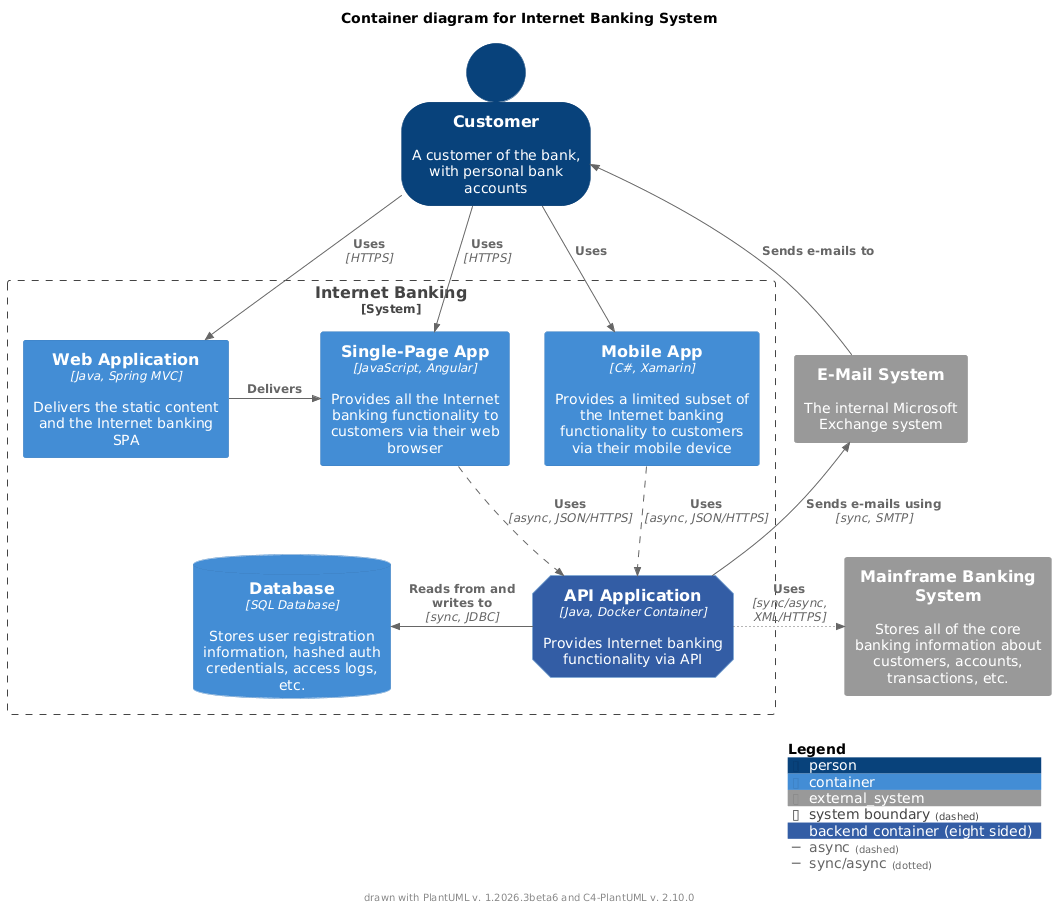
C4-PlantUML combines the benefits of [PlantUML](https://plantuml.com/) and the [C4 model](https://c4model.com/) for providing a simple way of describing and communicating software architectures – especially during up-front design sessions – with an intuitive language using open source and platform independent tools.
|
|
|
|
|
|
C4-PlantUML includes macros, stereotypes, and other goodies (like VSCode Snippets) for creating C4 diagrams with PlantUML.
|
|
|
|
|
|
- [📄 C4-PlantUML](#c4-plantuml)
|
|
|
- [Getting Started](#getting-started)
|
|
|
- [Including the C4-PlantUML library](#including-the-c4-plantuml-library)
|
|
|
- [Now let's create a C4 Container diagram](#now-lets-create-a-c4-container-diagram)
|
|
|
- [Supported Diagram Types](#supported-diagram-types)
|
|
|
- [System Context & System Landscape diagrams](#system-context--system-landscape-diagrams)
|
|
|
- [Container diagram](#container-diagram)
|
|
|
- [Component diagram](#component-diagram)
|
|
|
- [Dynamic diagram](#dynamic-diagram)
|
|
|
- [Deployment diagram](#deployment-diagram)
|
|
|
- [(C4 styled) Sequence diagram](#c4-styled-sequence-diagram)
|
|
|
- [Samples](#samples)
|
|
|
- [Relationship Types](#relationship-types)
|
|
|
- [Layout (arrange) elements (without relationships)](#layout-arrange-elements-without-relationships)
|
|
|
- [Global Layout Options](#global-layout-options)
|
|
|
- [Sprites and other images](#sprites-and-other-images)
|
|
|
- [Custom tags/stereotypes support and skinparam updates](#custom-tagsstereotypes-support-and-skinparam-updates)
|
|
|
- [Element specific tag definitions](#element-specific-tag-definitions)
|
|
|
- [Boundary specific tag definitions](#boundary-specific-tag-definitions)
|
|
|
- [Comments](#comments)
|
|
|
- [Sample with different tag combinations](#sample-with-different-tag-combinations)
|
|
|
- [Sample with tag dependent sprites and custom legend text](#sample-with-tag-dependent-sprites-and-custom-legend-text)
|
|
|
- [Sample with different boundary tag combinations](#sample-with-different-boundary-tag-combinations)
|
|
|
- [Custom schema definitions (via UpdateElementStyle())](#custom-schema-definitions-via-updateelementstyle)
|
|
|
- [Element and Relationship properties](#element-and-relationship-properties)
|
|
|
- [Version information](#version-information)
|
|
|
- [Snippets for Visual Studio Code](#snippets-for-visual-studio-code)
|
|
|
- [Live Templates for IntelliJ](#live-templates-for-intellij)
|
|
|
- [Prerequisites](#prerequisites)
|
|
|
- [Install](#install)
|
|
|
- [Usage](#usage)
|
|
|
- [Advanced Samples](#advanced-samples)
|
|
|
- [techtribes.js](#techtribesjs)
|
|
|
- [Message Bus and Microservices](#message-bus-and-microservices)
|
|
|
- [Background](#background)
|
|
|
- [License](#license)
|
|
|
- [📄 Layout Options](LayoutOptions.md#layout-options)
|
|
|
- [📄 Themes](Themes.md#themes)
|
|
|
- samples
|
|
|
- [📄 C4 Model Diagrams](samples/C4CoreDiagrams.md#c4-model-diagrams)
|
|
|
|
|
|
## Getting Started
|
|
|
|
|
|
### Including the C4-PlantUML library
|
|
|
|
|
|
At the top of your C4 PlantUML `.puml` file, you need to include the `C4_Context.puml`, `C4_Container.puml` or `C4_Component.puml` file found in the `root` of this repo.
|
|
|
|
|
|
To be independent of any Internet connectivity, you can download the files found in the `root` and make use of them by supplying the command line argument `-DRELATIVE_INCLUDE="."` to PlantUML:
|
|
|
|
|
|
```bash
|
|
|
java -jar plantuml.jar -DRELATIVE_INCLUDE="." ...
|
|
|
```
|
|
|
|
|
|
> For Visual Studio Code, add the following to your settings.json:
|
|
|
>
|
|
|
> ```json
|
|
|
> "plantuml.jarArgs": [
|
|
|
> "-DRELATIVE_INCLUDE=."
|
|
|
> ]
|
|
|
> ```
|
|
|
|
|
|
If you want to use the always up-to-date version of the C4-PlantUML library in this repo (which obviously requires an Internet connection every time you render a document), use the following:
|
|
|
|
|
|
[comment]: # ("!include followed with 2 spaces that it is not replaced during release based branch updates")
|
|
|
```plantuml
|
|
|
!include https://raw.githubusercontent.com/plantuml-stdlib/C4-PlantUML/master/C4_Container.puml
|
|
|
```
|
|
|
|
|
|
If you don't need the up-to-date version, PlantUML includes the last released `C4_...` files as [standard library C4](https://plantuml.com/stdlib#062f75176513a666) \(no additional files or Internet is required). You can use it with following:
|
|
|
|
|
|
```plantuml
|
|
|
!include <C4/C4_Container>
|
|
|
```
|
|
|
|
|
|
### Now let's create a C4 Container diagram
|
|
|
|
|
|
\(If you don't want run PlantUML locally you can use e.g. the [PlantUML Web Server](https://www.plantuml.com/plantuml/uml/ZKzDQy904BtlhqXpYb1tjNZgIT6ZegWzbyrcC0kJsMLdelZlJGAAfLHwUcyUl8-PizWaROFgpPF3jeAi5edyQKoo5ttoKhTbov1S804IxK9Z8bhgFMEM2drfbhFnhfU-Dcjp_j3JYPvqslUoirXFa7Ji2zGE4WSguW0Bz9RVitnjIy2y8zieFf35R0NiaX-kVAGU8OMxir_M8xYQ0eRJzKNGuSe2JS43_BTTxG5_3lvxnIFYQSv8pO6gxliR) too.)
|
|
|
|
|
|
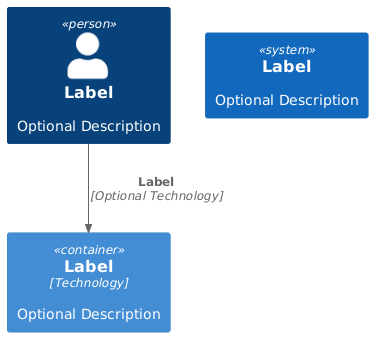
After you have included `C4_Container.puml` you can use the defined macro definitions for the C4 elements: `Person`, `Person_Ext`, `System`, `System_Ext`, `Container`, `Relationship`, `Boundary`, and `System_Boundary`
|
|
|
|
|
|
```plantuml
|
|
|
@startuml C4_Elements
|
|
|
!include https://raw.githubusercontent.com/plantuml-stdlib/C4-PlantUML/v2.10.0/C4_Container.puml
|
|
|
|
|
|
Person(personAlias, "Label", "Optional Description")
|
|
|
Container(containerAlias, "Label", "Technology", "Optional Description")
|
|
|
System(systemAlias, "Label", "Optional Description")
|
|
|
|
|
|
Rel(personAlias, containerAlias, "Label", "Optional Technology")
|
|
|
@enduml
|
|
|
```
|
|
|
|
|
|
|
|
|
|
|
|
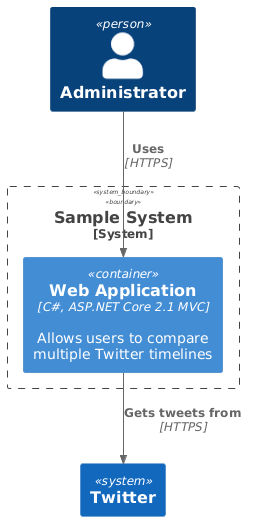
In addition to this, it is also possible to define a system or component boundary.
|
|
|
|
|
|
Take a look at the following sample of a C4 Container Diagram:
|
|
|
|
|
|
```plantuml
|
|
|
@startuml Basic Sample
|
|
|
!include https://raw.githubusercontent.com/plantuml-stdlib/C4-PlantUML/v2.10.0/C4_Container.puml
|
|
|
|
|
|
Person(admin, "Administrator")
|
|
|
System_Boundary(c1, "Sample System") {
|
|
|
Container(web_app, "Web Application", "C#, ASP.NET Core 2.1 MVC", "Allows users to compare multiple Twitter timelines")
|
|
|
}
|
|
|
System(twitter, "Twitter")
|
|
|
|
|
|
Rel(admin, web_app, "Uses", "HTTPS")
|
|
|
Rel(web_app, twitter, "Gets tweets from", "HTTPS")
|
|
|
@enduml
|
|
|
```
|
|
|
|
|
|
|
|
|
|
|
|
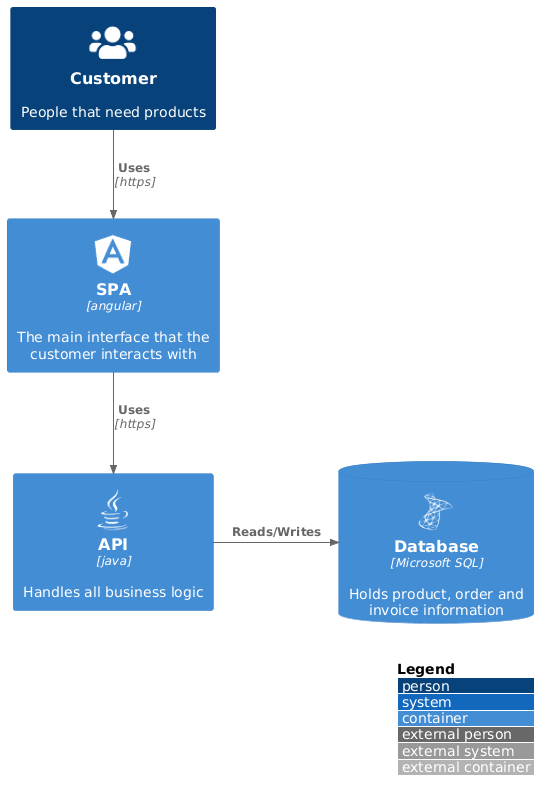
Entities can also be decorated with icons/sprites using the $sprite parameter, for example:
|
|
|
|
|
|
```plantuml
|
|
|
@startuml
|
|
|
!include https://raw.githubusercontent.com/plantuml-stdlib/C4-PlantUML/v2.10.0/C4_Container.puml
|
|
|
|
|
|
!define DEVICONS https://raw.githubusercontent.com/tupadr3/plantuml-icon-font-sprites/master/devicons
|
|
|
!define FONTAWESOME https://raw.githubusercontent.com/tupadr3/plantuml-icon-font-sprites/master/font-awesome-5
|
|
|
!include DEVICONS/angular.puml
|
|
|
!include DEVICONS/java.puml
|
|
|
!include DEVICONS/msql_server.puml
|
|
|
!include FONTAWESOME/users.puml
|
|
|
|
|
|
LAYOUT_WITH_LEGEND()
|
|
|
|
|
|
Person(user, "Customer", "People that need products", $sprite="users")
|
|
|
Container(spa, "SPA", "angular", "The main interface that the customer interacts with", $sprite="angular")
|
|
|
Container(api, "API", "java", "Handles all business logic", $sprite="java")
|
|
|
ContainerDb(db, "Database", "Microsoft SQL", "Holds product, order and invoice information", $sprite="msql_server")
|
|
|
|
|
|
Rel(user, spa, "Uses", "https")
|
|
|
Rel(spa, api, "Uses", "https")
|
|
|
Rel_R(api, db, "Reads/Writes")
|
|
|
@enduml
|
|
|
```
|
|
|
|
|
|
|
|
|
|
|
|
Similar to icons/sprites is it possible to add links to all elements and relationships:
|
|
|
|
|
|
```plantuml
|
|
|
@startuml Basic Sample
|
|
|
!include https://raw.githubusercontent.com/plantuml-stdlib/C4-PlantUML/v2.10.0/C4_Container.puml
|
|
|
|
|
|
Person(admin, "Administrator", $sprite="person2", $link="https://github.com/plantuml-stdlib/C4-PlantUML/blob/master/LayoutOptions.md#hide_person_sprite-or-show_person_spritesprite")
|
|
|
System_Boundary(c1, "Sample System", $link="https://github.com/plantuml-stdlib/C4-PlantUML") {
|
|
|
Container(web_app, "Web Application", "C#, ASP.NET Core 2.1 MVC", $descr="Allows users to compare multiple Twitter timelines", $link="https://github.com/plantuml-stdlib/C4-PlantUML/blob/master/LayoutOptions.md")
|
|
|
}
|
|
|
System(twitter, "Twitter", $link="https://github.com/plantuml-stdlib/C4-PlantUML")
|
|
|
|
|
|
Rel(admin, web_app, "Uses", "HTTPS", $link="https://plantuml.com/link")
|
|
|
Rel(web_app, twitter, "Gets tweets from", "HTTPS", $link="https://plantuml.com/link")
|
|
|
@enduml
|
|
|
```
|
|
|
|
|
|
> `png` itself supports no links, therefore the following image is generated as `svg` image.
|
|
|
> Github does not support `svg` links in README.md.
|
|
|
> If you click on the image a new window is opened and there you can use the links.
|
|
|
|
|
|
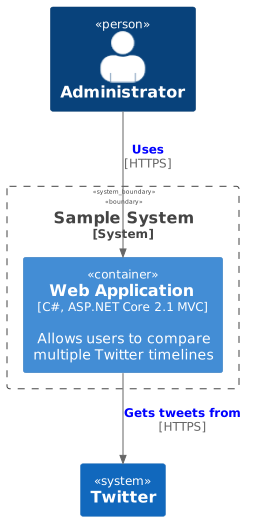
|
|
|
|
|
|
Elements and relationships can be decorated with tags and explained via a calculated legend, for example:
|
|
|
|
|
|
```plantuml
|
|
|
@startuml
|
|
|
!include https://raw.githubusercontent.com/plantuml-stdlib/C4-PlantUML/v2.10.0/C4_Container.puml
|
|
|
|
|
|
AddElementTag("v1.0", $borderColor="#d73027")
|
|
|
AddElementTag("v1.1", $fontColor="#d73027")
|
|
|
AddElementTag("backup", $fontColor="orange")
|
|
|
|
|
|
AddRelTag("backup", $textColor="orange", $lineColor="orange", $lineStyle = DashedLine())
|
|
|
|
|
|
Person(user, "Customer", "People that need products")
|
|
|
Person(admin, "Administrator", "People that administrates the products via the new v1.1 components", $tags="v1.1")
|
|
|
Container(spa, "SPA", "angular", "The main interface that the customer interacts with via v1.0", $tags="v1.0")
|
|
|
Container(spaAdmin, "Admin SPA", "angular", "The administrator interface that the customer interacts with via new v1.1", $tags="v1.1")
|
|
|
Container(api, "API", "java", "Handles all business logic (incl. new v1.1 extensions)", $tags="v1.0+v1.1")
|
|
|
ContainerDb(db, "Database", "Microsoft SQL", "Holds product, order and invoice information")
|
|
|
Container(archive, "Archive", "Audit logging", "Stores 5 years", $tags="backup")
|
|
|
|
|
|
Rel(user, spa, "Uses", "https")
|
|
|
Rel(spa, api, "Uses", "https")
|
|
|
Rel_R(api, db, "Reads/Writes")
|
|
|
Rel(admin, spaAdmin, "Uses", "https")
|
|
|
Rel(spaAdmin, api, "Uses", "https")
|
|
|
Rel_L(api, archive, "Writes", "messages", $tags="backup")
|
|
|
|
|
|
SHOW_LEGEND()
|
|
|
@enduml
|
|
|
```
|
|
|
|
|
|
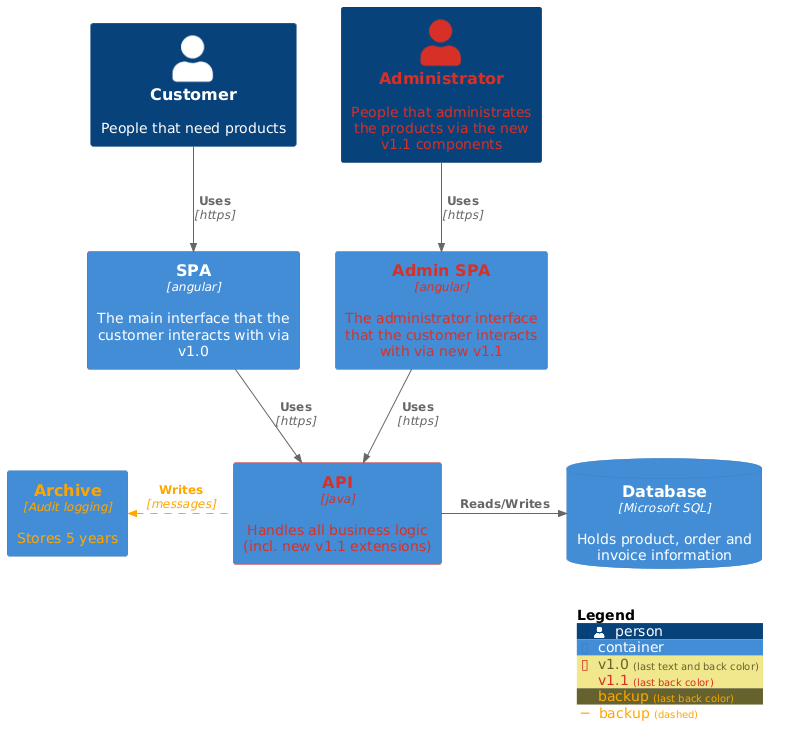
|
|
|
|
|
|
## Supported Diagram Types
|
|
|
|
|
|
> - `arg`: argument required (e.g. `alias`)
|
|
|
> - `?arg`: argument optional (e.g. `?tags`); an optional argument can be directly set via its keyword `$arg=...` (e.g. `$tags="specificTag"`) without the other optional arguments
|
|
|
|
|
|
### System Context & System Landscape diagrams
|
|
|
|
|
|
- Import: `!include https://raw.githubusercontent.com/plantuml-stdlib/C4-PlantUML/v2.10.0/C4_Context.puml`
|
|
|
- Macros:
|
|
|
- `Person(alias, label, ?descr, ?sprite, ?tags, ?link, ?type)`
|
|
|
- `Person_Ext(alias, label, ?descr, ?sprite, ?tags, ?link, ?type)`
|
|
|
- `System(alias, label, ?descr, ?sprite, ?tags, ?link, ?type, ?baseShape)`
|
|
|
- `SystemDb(alias, label, ?descr, ?sprite, ?tags, ?link, ?type)`
|
|
|
- `SystemQueue(alias, label, ?descr, ?sprite, ?tags, ?link, ?type)`
|
|
|
- `System_Ext(alias, label, ?descr, ?sprite, ?tags, ?link, ?type, ?baseShape)`
|
|
|
- `SystemDb_Ext(alias, label, ?descr, ?sprite, ?tags, ?link, ?type)`
|
|
|
- `SystemQueue_Ext(alias, label, ?descr, ?sprite, ?tags, ?link, ?type)`
|
|
|
- `Boundary(alias, label, ?type, ?tags, ?link, ?descr)`
|
|
|
- `Enterprise_Boundary(alias, label, ?tags, ?link, ?descr)`
|
|
|
- `System_Boundary(alias, label, ?tags, ?link, ?descr)`
|
|
|
- Sprites:
|
|
|
- `person`
|
|
|
- `person2`
|
|
|
- `robot`
|
|
|
- `robot2`
|
|
|
|
|
|
- C4 Model extension: Person() and System() support `$type` argument too. Is uses the same notation as `$techn`, e.g. `$type="characteristic A"` is displayed as `[characteristic A]`
|
|
|
|
|
|
### Container diagram
|
|
|
|
|
|
- Import: `!include https://raw.githubusercontent.com/plantuml-stdlib/C4-PlantUML/v2.10.0/C4_Container.puml`
|
|
|
- Additional Macros (based on context diagram macros):
|
|
|
- `Container(alias, label, ?techn, ?descr, ?sprite, ?tags, ?link, ?baseShape)`
|
|
|
- `ContainerDb(alias, label, ?techn, ?descr, ?sprite, ?tags, ?link)`
|
|
|
- `ContainerQueue(alias, label, ?techn, ?descr, ?sprite, ?tags, ?link)`
|
|
|
- `Container_Ext(alias, label, ?techn, ?descr, ?sprite, ?tags, ?link, ?baseShape)`
|
|
|
- `ContainerDb_Ext(alias, label, ?techn, ?descr, ?sprite, ?tags, ?link)`
|
|
|
- `ContainerQueue_Ext(alias, label, ?techn, ?descr, ?sprite, ?tags, ?link)`
|
|
|
- `Container_Boundary(alias, label, ?tags, ?link, ?descr)`
|
|
|
|
|
|
### Component diagram
|
|
|
|
|
|
- Import: `!include https://raw.githubusercontent.com/plantuml-stdlib/C4-PlantUML/v2.10.0/C4_Component.puml`
|
|
|
- Additional Macros (based on container diagram macros):
|
|
|
- `Component(alias, label, ?techn, ?descr, ?sprite, ?tags, ?link, ?baseShape)`
|
|
|
- `ComponentDb(alias, label, ?techn, ?descr, ?sprite, ?tags, ?link)`
|
|
|
- `ComponentQueue(alias, label, ?techn, ?descr, ?sprite, ?tags, ?link)`
|
|
|
- `Component_Ext(alias, label, ?techn, ?descr, ?sprite, ?tags, ?link, ?baseShape)`
|
|
|
- `ComponentDb_Ext(alias, label, ?techn, ?descr, ?sprite, ?tags, ?link)`
|
|
|
- `ComponentQueue_Ext(alias, label, ?techn, ?descr, ?sprite, ?tags, ?link)`
|
|
|
|
|
|
### Dynamic diagram
|
|
|
|
|
|
- Import: `!include https://raw.githubusercontent.com/plantuml-stdlib/C4-PlantUML/v2.10.0/C4_Dynamic.puml`
|
|
|
- Additional Macros (based on component diagram macros):
|
|
|
- (lowercase) `increment($offset=1)`: increase current index (procedure which has no direct output)
|
|
|
- (lowercase) `setIndex($new_index)`: set the new index (procedure which has no direct output)
|
|
|
- `LastIndex()`: return the last used index (function which can be used as argument)
|
|
|
|
|
|
following 2 macros requires V1.2020.24Beta4 (can be already tested with <https://www.plantuml.com/plantuml/>)
|
|
|
- `Index($offset=1)`: returns current index and calculates next index (function which can be used as argument)
|
|
|
- `SetIndex($new_index)`: returns new set index and calculates next index (function which can be used as argument)
|
|
|
|
|
|
- All relationship macros are extended with `?index= `:
|
|
|
|
|
|
> All `RelIndex...()` calls are obsolete and can be replaced with calls like Rel($index=..., ...) or Rel(..., $index=).
|
|
|
> A full sample see [samples/C4_Dynamic Diagram Sample - message bus.puml](samples/C4_Dynamic%20Diagram%20Sample%20-%20message%20bus.puml)
|
|
|
|
|
|
### Deployment diagram
|
|
|
|
|
|
- Import: `!include https://raw.githubusercontent.com/plantuml-stdlib/C4-PlantUML/v2.10.0/C4_Deployment.puml`
|
|
|
- Additional Macros (based on **container** diagram macros):
|
|
|
- `Deployment_Node(alias, label, ?type, ?descr, ?sprite, ?tags, ?link)`
|
|
|
- `Node(alias, label, ?type, ?descr, ?sprite, ?tags, ?link)`: short name of Deployment_Node()
|
|
|
- `Node_L(alias, label, ?type, ?descr, ?sprite, ?tags, ?link)`: left aligned Node()
|
|
|
- `Node_R(alias, label, ?type, ?descr, ?sprite, ?tags, ?link)`: right aligned Node()
|
|
|
|
|
|
### (C4 styled) Sequence diagram
|
|
|
|
|
|
C4-PlantUML **does not offer** a full sequence diagram support,
|
|
|
but existing elements and relationships can be reused as participants and calls in the corresponding styles.
|
|
|
|
|
|
> **!!! Contrary to all other diagrams, please define boundaries without `{` and `}` and mark a boundary end with `Boundary_End()` !!!**
|
|
|
|
|
|
- Import: `!include https://raw.githubusercontent.com/plantuml-stdlib/C4-PlantUML/v2.10.0/C4_Sequence.puml`
|
|
|
- Macros (based on **component** diagram macros):
|
|
|
- Basically all element specific macros (Person, System, Container...) can be reused with following differences:
|
|
|
- element descriptions are typically not displayed (can be activated via SHOW_ELEMENT_DESCRIPTIONS())
|
|
|
- **boundaries have to be defined without `{` and `}`** and instead of `}` the **`Boundary_End()`** macro has to be called
|
|
|
- Additional (element specific) Macros:
|
|
|
- `Boundary_End()`
|
|
|
- Additional Layout Options:
|
|
|
- `SHOW_ELEMENT_DESCRIPTIONS(?show)`
|
|
|
- `SHOW_FOOT_BOXES(?show)`
|
|
|
- `SHOW_INDEX(?show)`
|
|
|
- Only following (extended) relationship specific macros is supported:
|
|
|
- `Rel($from, $to, $label, $techn="", $descr="", $sprite="", $tags="", $link="", $index="", $rel="")`
|
|
|
`$index` enables the definition of active/next index with e.g. the related index macros below
|
|
|
`$rel` enables the definition of all PlantUML specific arrow types, details see e.g.
|
|
|
[All arrow types](https://plantuml.com/sequence-diagram#4764f83f72ed032f) and
|
|
|
[Slanted or odd arrows](https://plantuml.com/sequence-diagram#5bd6712206960fab)
|
|
|
- The index related macros (like the dynamic diagram)
|
|
|
- `Index($offset=1)`: returns current index and calculates next index (function which can be used as argument)
|
|
|
- `SetIndex($new_index)`: returns new set index and calculates next index (function which can be used as argument)
|
|
|
- `LastIndex()`: return the last used index (function which can be used as argument)
|
|
|
- (lowercase) `increment($offset=1)`: increase current index (procedure which has no direct output)
|
|
|
- (lowercase) `setIndex($new_index)`: set the new index (procedure which has no direct output)
|
|
|
|
|
|
- (Typically additional used) PlantUML statements:
|
|
|
- [Grouping message](https://plantuml.com/sequence-diagram#425ba4350c02142c)
|
|
|
- [Divider or separator](https://plantuml.com/sequence-diagram#d4b2df53a72661cc)
|
|
|
- [Reference](https://plantuml.com/sequence-diagram#63d5049791d9d79d)
|
|
|
- [Delay](https://plantuml.com/sequence-diagram#8f497c1a3d15af9e)
|
|
|
|
|
|
### Samples
|
|
|
|
|
|
Take a look at each of the [C4 Model Diagram Samples](samples/C4CoreDiagrams.md).
|
|
|
|
|
|
## Relationship Types
|
|
|
|
|
|
- `Rel(from, to, label, ?techn, ?descr, ?sprite, ?tags, ?link)`
|
|
|
- `BiRel` (bidirectional relationship)
|
|
|
|
|
|
You can force the direction of a relationship by using:
|
|
|
|
|
|
- `Rel_U`, `Rel_Up`
|
|
|
- `Rel_D`, `Rel_Down`
|
|
|
- `Rel_L`, `Rel_Left`
|
|
|
- `Rel_R`, `Rel_Right`
|
|
|
|
|
|
In following sample a person uses different systems, and a group of persons which have bidirectional relationships
|
|
|
|
|
|
```plantuml
|
|
|
@startuml
|
|
|
!include https://raw.githubusercontent.com/plantuml-stdlib/C4-PlantUML/v2.10.0/C4_Container.puml
|
|
|
HIDE_STEREOTYPE()
|
|
|
|
|
|
Person(a, "A")
|
|
|
Person(b, "B")
|
|
|
Person(c, "C")
|
|
|
Person(d, "D")
|
|
|
Person(e, "E")
|
|
|
|
|
|
BiRel_U(a, b, "talk with")
|
|
|
BiRel_R(a, c, "talk with")
|
|
|
BiRel_D(a, d, "talk with")
|
|
|
BiRel_L(a, e, "talk with")
|
|
|
|
|
|
Person(x, "X")
|
|
|
System(s1, "S1")
|
|
|
System(s2, "S2")
|
|
|
System(s3, "S3")
|
|
|
System(s4, "S4")
|
|
|
|
|
|
Rel_U(x, s1, "uses")
|
|
|
Rel_R(x, s2, "uses")
|
|
|
Rel_D(x, s3, "uses")
|
|
|
Rel_L(x, s4, "uses")
|
|
|
@enduml
|
|
|
```
|
|
|
|
|
|
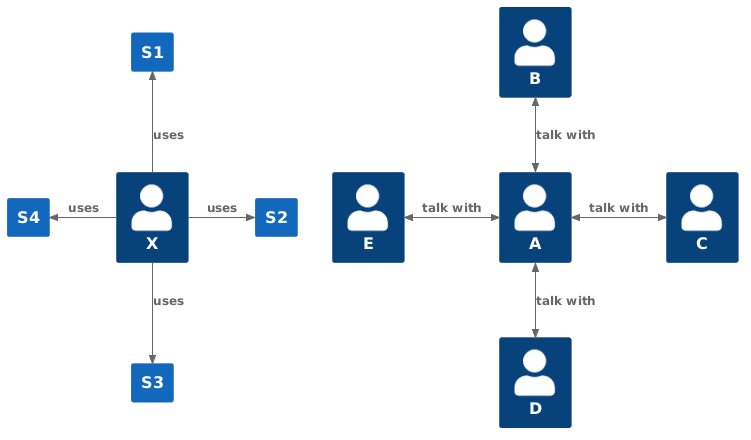
|
|
|
|
|
|
## Layout (arrange) elements (without relationships)
|
|
|
|
|
|
In rare cases, you can force the layout of elements which have no relationships by using:
|
|
|
|
|
|
- `Lay_U(from, to)`, `Lay_Up(from, to)`
|
|
|
- `Lay_D(from, to)`, `Lay_Down(from, to)`
|
|
|
- `Lay_L(from, to)`, `Lay_Left(from, to)`
|
|
|
- `Lay_R(from, to)`, `Lay_Right(from, to)`
|
|
|
|
|
|
In following sample a person uses different systems, and a group of persons which have no relationships
|
|
|
|
|
|
```plantuml
|
|
|
@startuml
|
|
|
!include https://raw.githubusercontent.com/plantuml-stdlib/C4-PlantUML/v2.10.0/C4_Container.puml
|
|
|
HIDE_STEREOTYPE()
|
|
|
|
|
|
Person(a, "A")
|
|
|
Person(b, "B")
|
|
|
Person(c, "C")
|
|
|
Person(d, "D")
|
|
|
Person(e, "E")
|
|
|
|
|
|
Lay_U(a, b)
|
|
|
Lay_R(a, c)
|
|
|
Lay_D(a, d)
|
|
|
Lay_L(a, e)
|
|
|
|
|
|
Person(x, "X")
|
|
|
System(s1, "S1")
|
|
|
System(s2, "S2")
|
|
|
System(s3, "S3")
|
|
|
System(s4, "S4")
|
|
|
|
|
|
Rel_U(x, s1, "uses")
|
|
|
Rel_R(x, s2, "uses")
|
|
|
Rel_D(x, s3, "uses")
|
|
|
Rel_L(x, s4, "uses")
|
|
|
@enduml
|
|
|
```
|
|
|
|
|
|
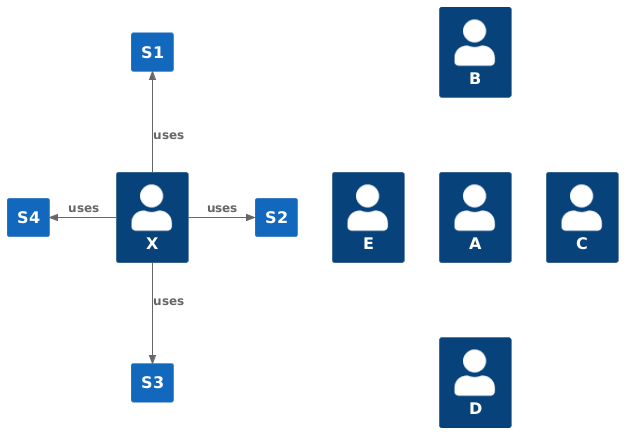
|
|
|
|
|
|
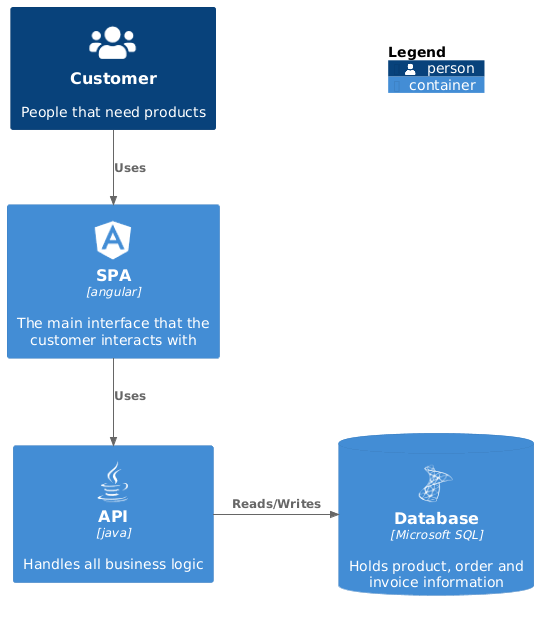
(In combination with [SHOW_FLOATING_LEGEND()](LayoutOptions.md#show_floating_legendalias-hidestereotype-details-and-legend)) a greater distance between an element and the
|
|
|
e.g. floating legend could be required that all e.g. corners of the drawing area can be reached.
|
|
|
|
|
|
- `Lay_Distance(from, to, ?distance)`: Sets the distance between `from` and `to` with down alignment (Lay_Distance(from,to,0) equals Lay_D(from, to)). The default alias of the floating legend is LEGEND().
|
|
|
|
|
|
In following sample the floating legend should be in the left bottom corner of the drawing are.
|
|
|
(The normal SHOW_LEGEND() call requires no extra Lay_Distance() call and the legend is automatically drawn below the diagram on the right side)
|
|
|
|
|
|
```plantuml
|
|
|
@startuml
|
|
|
!include https://raw.githubusercontent.com/plantuml-stdlib/C4-PlantUML/v2.10.0/C4_Container.puml
|
|
|
|
|
|
!define DEVICONS https://raw.githubusercontent.com/tupadr3/plantuml-icon-font-sprites/master/devicons
|
|
|
!define FONTAWESOME https://raw.githubusercontent.com/tupadr3/plantuml-icon-font-sprites/master/font-awesome-5
|
|
|
!include DEVICONS/angular.puml
|
|
|
!include DEVICONS/java.puml
|
|
|
!include DEVICONS/msql_server.puml
|
|
|
!include FONTAWESOME/users.puml
|
|
|
|
|
|
Person(user, "Customer", "People that need products", $sprite="users")
|
|
|
Container(spa, "SPA", "angular", "The main interface that the customer interacts with", $sprite="angular")
|
|
|
Container(api, "API", "java", "Handles all business logic", $sprite="java")
|
|
|
ContainerDb(db, "Database", "Microsoft SQL", "Holds product, order and invoice information", $sprite="msql_server")
|
|
|
|
|
|
Rel(user, spa, "Uses")
|
|
|
Rel(spa, api, "Uses")
|
|
|
Rel_R(api, db, "Reads/Writes")
|
|
|
|
|
|
SHOW_FLOATING_LEGEND()
|
|
|
Lay_Distance(LEGEND(), db, 1)
|
|
|
@enduml
|
|
|
```
|
|
|
|
|
|
|
|
|
|
|
|
## Global Layout Options
|
|
|
|
|
|
C4-PlantUML also comes with some layout options to make it easy and reusable to create nice and useful diagrams:
|
|
|
|
|
|
- [LAYOUT_TOP_DOWN() or LAYOUT_LEFT_RIGHT() or LAYOUT_LANDSCAPE()](LayoutOptions.md#layout_top_down-or-layout_left_right-or-layout_landscape)
|
|
|
- [LAYOUT_WITH_LEGEND() or SHOW_LEGEND(?hideStereotype, ?details)](LayoutOptions.md#layout_with_legend-or-show_legend)
|
|
|
- [SHOW_FLOATING_LEGEND(?alias, ?hideStereotype, ?details) and LEGEND()](LayoutOptions.md#show_floating_legendalias-hidestereotype-and-legend)
|
|
|
- [LAYOUT_AS_SKETCH() and SET_SKETCH_STYLE(?bgColor, ?fontColor, ?warningColor, ?fontName, ?footerWarning, ?footerText)](LayoutOptions.md#layout_as_sketch)
|
|
|
- [HIDE_STEREOTYPE()](LayoutOptions.md#hide_stereotype)
|
|
|
|
|
|
C4-PlantUML also comes with some person sprite/portrait options:
|
|
|
|
|
|
- [HIDE_PERSON_SPRITE()](LayoutOptions.md#hide_person_sprite)
|
|
|
- [SHOW_PERSON_SPRITE(?sprite)](LayoutOptions.md#show_person_sprite)
|
|
|
- [SHOW_PERSON_PORTRAIT()](LayoutOptions.md#show_person_portrait)
|
|
|
- [SHOW_PERSON_OUTLINE()](LayoutOptions.md#show_person_outline) (requires PlantUML version >= 1.2021.4)
|
|
|
|
|
|
## Sprites and other images
|
|
|
|
|
|
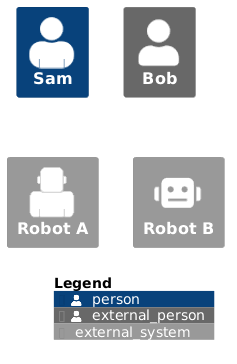
C4-PlantUML offers predefined person and robot sprites which can be directly used:
|
|
|
|
|
|
- `person`,`person2`
|
|
|
- `robot`, `robot2`
|
|
|
|
|
|
```plantuml
|
|
|
@startuml
|
|
|
!include https://raw.githubusercontent.com/plantuml-stdlib/C4-PlantUML/v2.10.0/C4_Component.puml
|
|
|
|
|
|
Person(pB, "Sam", $sprite="person2")
|
|
|
Person_Ext(pA, "Bob", $sprite="person")
|
|
|
|
|
|
System_Ext(robB, "Robot A", $sprite="robot2")
|
|
|
System_Ext(robA, "Robot B", $sprite="robot")
|
|
|
|
|
|
SHOW_LEGEND()
|
|
|
@enduml
|
|
|
```
|
|
|
|
|
|
|
|
|
|
|
|
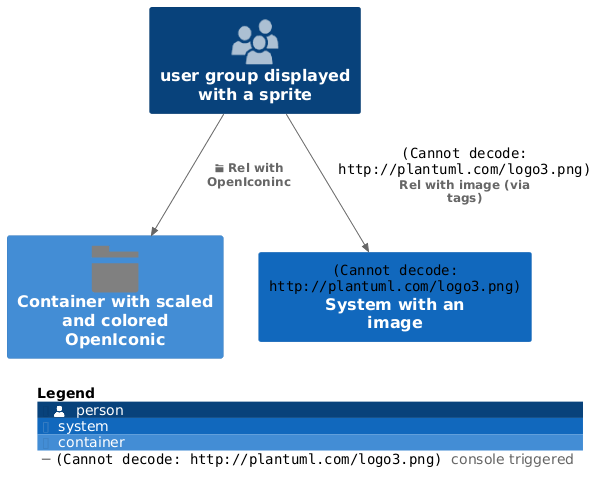
Additional `$sprite` (images) can be defined with following PlantUML supported options:
|
|
|
|
|
|
- included (standard library) sprites via their `{SpriteName}`; details see [sprites](https://plantuml.com/sprite)
|
|
|
- images via `img:{File or Url}`
|
|
|
- OpenIconic via `&{OpenIconicName}`; details see [openiconic](https://plantuml.com/openiconic)
|
|
|
|
|
|
Size of the displayed images can be changed with `,scale={factor}`.
|
|
|
Color of the displayed images can be changed with `,color={color}`.
|
|
|
|
|
|
(If sprites are defined via $tags then the calculated legend is updated too)
|
|
|
|
|
|
```plantuml
|
|
|
@startuml
|
|
|
!include https://raw.githubusercontent.com/plantuml-stdlib/C4-PlantUML/v2.10.0/C4_Container.puml
|
|
|
|
|
|
'stdlib users.puml defines sprite "users"
|
|
|
!include <office/users/users.puml>
|
|
|
|
|
|
|
|
|
AddRelTag("plantuml", $textColor="$ARROW_FONT_COLOR", $lineColor="$ARROW_COLOR", $sprite="img:http://plantuml.com/logo3.png{scale=0.3}", $legendSprite="img:http://plantuml.com/logo3.png{scale=0.1}", $legendText="console triggered")
|
|
|
|
|
|
Person(user, "user group displayed with a sprite", $sprite="users")
|
|
|
|
|
|
|
|
|
Container(container, "Container with scaled and colored OpenIconic", $sprite="&folder,scale=5.0,color=gray")
|
|
|
|
|
|
System(system, "System with an image", $sprite="img:http://plantuml.com/logo3.png")
|
|
|
|
|
|
Rel(user, system, "Rel with image (via tags)", $tags="plantuml")
|
|
|
Rel(user, container, "Rel with OpenIconinc", $sprite="&folder")
|
|
|
|
|
|
SHOW_LEGEND()
|
|
|
@enduml
|
|
|
```
|
|
|
|
|
|
|
|
|
|
|
|
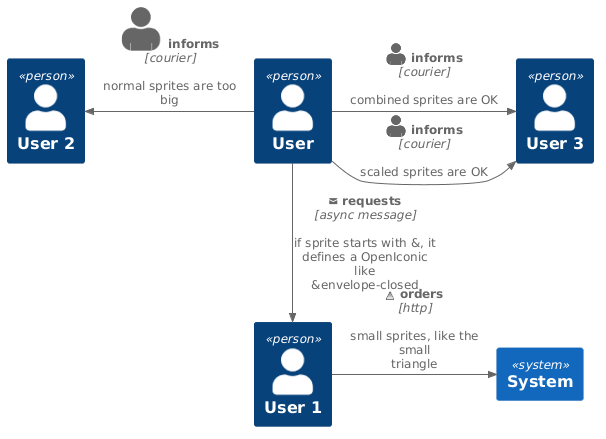
Relationship specific sprites are typically smaller and therefore following options are possible:
|
|
|
|
|
|
- use smaller icons (like the $triangle in the following sample)
|
|
|
- use an additional scale factor (direct as part of the argument, or via a variable)
|
|
|
- if sprite argument starts with `&` an OpenIconic name can be used too (details see <https://useiconic.com/open>)
|
|
|
|
|
|
```plantuml
|
|
|
@startuml
|
|
|
!include https://raw.githubusercontent.com/plantuml-stdlib/C4-PlantUML/v2.10.0/C4_Context.puml
|
|
|
|
|
|
Person(user, "User")
|
|
|
Person(user1, "User 1")
|
|
|
Person(user2, "User 2")
|
|
|
Person(user3, "User 3")
|
|
|
|
|
|
System(system, "System")
|
|
|
|
|
|
' normal sprites are too big
|
|
|
Rel_L(user, user2, "informs", "courier", "normal sprites are too big", $sprite="person2")
|
|
|
|
|
|
' scaled sprites are ok
|
|
|
Rel_R(user, user3, "informs", "courier", "scaled sprites are OK", $sprite="person2,scale=0.5")
|
|
|
|
|
|
' combine sprite and scale to a new sprite
|
|
|
!$combinedSprite="person2,scale=0.5"
|
|
|
Rel_R(user, user3, "informs", "courier", "combined sprites are OK", $sprite=$combinedSprite)
|
|
|
|
|
|
' special smaller sprites can be used
|
|
|
sprite $triangle {
|
|
|
00000000000
|
|
|
00000F00000
|
|
|
0000FBF0000
|
|
|
0000FBF0000
|
|
|
000F999F000
|
|
|
000F999F000
|
|
|
00F66666F00
|
|
|
00F66666F00
|
|
|
0F3333333F0
|
|
|
0F3333333F0
|
|
|
0FFFFFFFFF0
|
|
|
00000000000
|
|
|
}
|
|
|
Rel_R(user1, system, "orders", "http", "small sprites, like the small triangle", $sprite="triangle")
|
|
|
|
|
|
' if sprite starts with &, sprite defines a OpenIconic, details see https://useiconic.com/open/
|
|
|
Rel_D(user, user1, "requests", "async message", "if sprite starts with &, it defines a OpenIconic like &envelope-closed", $sprite = "&envelope-closed")
|
|
|
@enduml
|
|
|
```
|
|
|
|
|
|
|
|
|
|
|
|
## Custom tags/stereotypes support and skinparam updates
|
|
|
|
|
|
Additional tags/stereotypes can be added to the existing element stereotypes (component, ...) and highlight,... specific aspects:
|
|
|
|
|
|
- `AddElementTag(tagStereo, ?bgColor, ?fontColor, ?borderColor, ?shadowing, ?shape, ?sprite, ?techn, ?legendText, ?legendSprite, ?borderStyle, ?borderThickness)`:
|
|
|
Introduces a new element tag. The styles of the tagged elements are updated and the tag is displayed in the calculated legend.
|
|
|
- `AddRelTag(tagStereo, ?textColor, ?lineColor, ?lineStyle, ?sprite, ?techn, ?legendText, ?legendSprite, ?lineThickness)`:
|
|
|
Introduces a new Relationship tag. The styles of the tagged relationships are updated and the tag is displayed in the calculated legend.
|
|
|
- `AddBoundaryTag(tagStereo, ?bgColor, ?fontColor, ?borderColor, ?shadowing, ?shape, ?type, ?legendText, ?borderStyle, ?borderThickness, ?borderStyle, ?borderThickness, ?sprite, ?legendSprite)`:
|
|
|
Introduces a new Boundary tag. The styles of the tagged boundaries are updated and the tag is displayed in the calculated legend.
|
|
|
- `UpdateElementStyle(elementName, ?bgColor, ?fontColor, ?borderColor, ?shadowing, ?shape, ?sprite, ?techn, ?legendText, ?legendSprite, ?borderStyle, ?borderThickness)`:
|
|
|
This call updates the default style of the elements (component, ...) and creates no additional legend entry.
|
|
|
- `UpdateRelStyle(textColor, lineColor)`:
|
|
|
This call updates the default relationship colors and creates no additional legend entry.
|
|
|
- `UpdateBoundaryStyle(?elementName, ?bgColor, ?fontColor, ?borderColor, ?shadowing, ?shape, ?type, ?legendText, ?borderStyle, ?borderThickness, ?sprite, ?legendSprite)`:
|
|
|
This call updates the default style of the existing boundaries and creates no additional legend entry.
|
|
|
If the element name is "" then it updates generic, enterprise, system and container boundary style in on call.
|
|
|
- `RoundedBoxShape()`: This call returns the name of the rounded box shape and can be used as ?shape argument.
|
|
|
- `EightSidedShape()`: This call returns the name of the eight sided shape and can be used as ?shape argument.
|
|
|
- `DashedLine()`: This call returns the name of the dashed line and can be used as ?lineStyle or ?borderStyle argument.
|
|
|
- `DottedLine()`: This call returns the name of the dotted line and can be used as ?lineStyle or ?borderStyle argument.
|
|
|
- `BoldLine()`: This call returns the name of the bold line and can be used as ?lineStyle or ?borderStyle argument.
|
|
|
- `SolidLine()`: This call returns the name of the solid line and can be used as ?lineStyle or ?borderStyle argument (enables e.g. a reset of dashed boundaries).
|
|
|
|
|
|
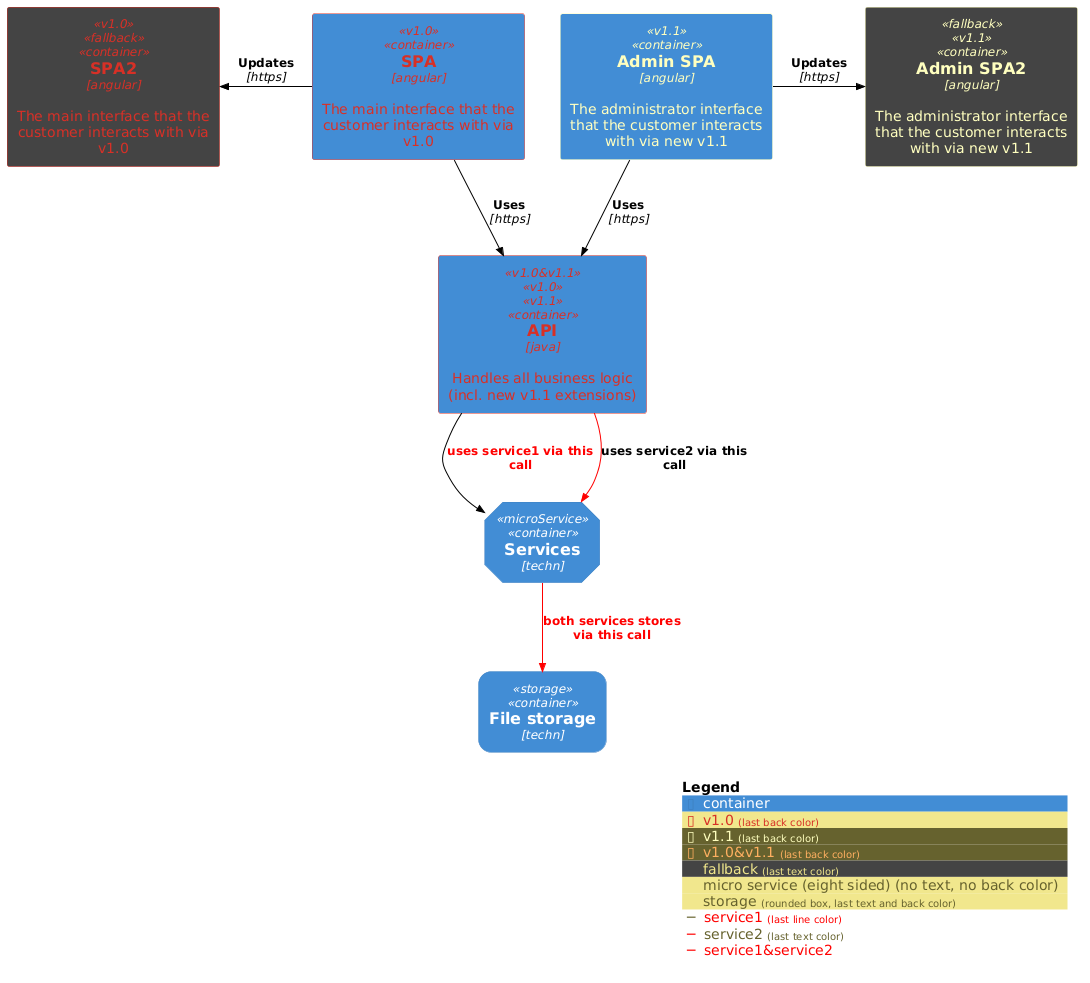
Each element can be extended with one or multiple custom tags via the keyword argument `$tags="..."`, like `Container(spaAdmin, "Admin SPA", $tags="v1.1")`.
|
|
|
Multiple tags can be combined with `+`, like `Container(api, "API", $tags="v1.0+v1.1")`.
|
|
|
|
|
|
### Element specific tag definitions
|
|
|
|
|
|
Sometimes an added element tag is element specific and all element specific colors should be used, e.g. a specific user role should be defined as element tag with the specific colors `...PERSON_...` like
|
|
|
|
|
|
```plantuml
|
|
|
AddElementTag("admin", $fontColor=$PERSON_FONT_COLOR, $bgColor=$PERSON_BG_COLOR, $borderColor=$PERSON_BORDER_COLOR, $sprite="osa_user_audit", $legendText="administration user")
|
|
|
```
|
|
|
|
|
|
Therefore element Add...Tag() shortcuts are added which use the specific colors as default values and the call can be simplified like
|
|
|
|
|
|
```plantuml
|
|
|
AddPersonTag("admin", $sprite="osa_user_audit", $legendText="administration user")
|
|
|
```
|
|
|
|
|
|
Following calls introduces new element tags with element specific default colors:
|
|
|
|
|
|
- `AddPersonTag(tagStereo, ?bgColor, ?fontColor, ?borderColor, ?shadowing, ?shape, ?sprite, ?legendText, ?legendSprite, ?type, ?borderStyle, ?borderThickness)`
|
|
|
- `AddExternalPersonTag(tagStereo, ?bgColor, ?fontColor, ?borderColor, ?shadowing, ?shape, ?sprite, ?legendText, ?legendSprite, ?type, ?borderStyle, ?borderThickness)`
|
|
|
- `AddSystemTag(tagStereo, ?bgColor, ?fontColor, ?borderColor, ?shadowing, ?shape, ?sprite, ?legendText, ?legendSprite, ?type, ?borderStyle, ?borderThickness)`
|
|
|
- `AddExternalSystemTag(tagStereo, ?bgColor, ?fontColor, ?borderColor, ?shadowing, ?shape, ?sprite, ?legendText, ?legendSprite, ?type, ?borderStyle, ?borderThickness)`
|
|
|
- `AddComponentTag(tagStereo, ?bgColor, ?fontColor, ?borderColor, ?shadowing, ?shape, ?sprite, ?techn, ?legendText, ?legendSprite, ?borderStyle, ?borderThickness)`
|
|
|
- `AddExternalComponentTag(tagStereo, ?bgColor, ?fontColor, ?borderColor, ?shadowing, ?shape, ?sprite, ?techn, ?legendText, ?legendSprite, ?borderStyle, ?borderThickness)`
|
|
|
- `AddContainerTag(tagStereo, ?bgColor, ?fontColor, ?borderColor, ?shadowing, ?shape, ?sprite, ?techn, ?legendText, ?legendSprite, ?borderStyle, ?borderThickness)`
|
|
|
- `AddExternalContainerTag(tagStereo, ?bgColor, ?fontColor, ?borderColor, ?shadowing, ?shape, ?techn, ?sprite, ?legendText, ?legendSprite, ?borderStyle, ?borderThickness)`
|
|
|
- `AddNodeTag(tagStereo, ?bgColor, ?fontColor, ?borderColor, ?shadowing, ?shape, ?sprite, ?techn, ?legendText, ?legendSprite, ?borderStyle, ?borderThickness)`
|
|
|
(node specific: $type reuses $techn definition of $tags)
|
|
|
|
|
|
### Boundary specific tag definitions
|
|
|
|
|
|
Like the element specific tag definitions exist boundary specific calls with their default colors **and type**:
|
|
|
|
|
|
- `UpdateContainerBoundaryStyle(?bgColor, ?fontColor, ?borderColor, ?shadowing, ?shape, ?type, ?legendText, ?borderStyle, ?borderThickness, ?sprite, ?legendSprite)`
|
|
|
- `UpdateSystemBoundaryStyle(?bgColor, ?fontColor, ?borderColor, ?shadowing, ?shape, ?type, ?legendText, ?borderStyle, ?borderThickness, ?sprite, ?legendSprite)`
|
|
|
- `UpdateEnterpriseBoundaryStyle(?bgColor, ?fontColor, ?borderColor, ?shadowing, ?shape, ?type, ?legendText, ?borderStyle, ?borderThickness, ?sprite, ?legendSprite)`
|
|
|
|
|
|
### Comments
|
|
|
|
|
|
- `SHOW_LEGEND()` supports the customized stereotypes
|
|
|
(`LAYOUT_WITH_LEGEND()` cannot be used, if the custom tags/stereotypes should be displayed in the legend).
|
|
|
- `SHOW_LEGEND()` has to be last line in diagram.
|
|
|
- Don't use space between `$tags` and `=` (PlantUML does not support it).
|
|
|
- Don't use `,` as part of the tag names (PlantUML does not support it in combination with keyword arguments).
|
|
|
- If 2 tags define the same skinparam, the first definition is used.
|
|
|
- If specific skinparams have to be merged (e.g. 2 tags change the font color) an additional combined tag has to be defined. Use `&` as part of combined tag names.
|
|
|
|
|
|
- Automatically merging colors of relationship tags is not supported in PlantUML before v.1.2022
|
|
|
If an older version is used and one tag modifies the line color and the other the text color, an additional combined tag has to be defined and used.
|
|
|
|
|
|
### Sample with different tag combinations
|
|
|
|
|
|
```plantuml
|
|
|
@startuml
|
|
|
!include https://raw.githubusercontent.com/plantuml-stdlib/C4-PlantUML/v2.10.0/C4_Container.puml
|
|
|
|
|
|
UpdateElementStyle(person, $fontColor="green")
|
|
|
AddElementTag("v1.0", $fontColor="#d73027", $borderColor="#d73027")
|
|
|
AddElementTag("v1.1", $fontColor="#ffffbf", $borderColor="#ffffbf")
|
|
|
AddElementTag("v1.0&v1.1", $fontColor="#fdae61", $borderColor="#fdae61")
|
|
|
AddElementTag("fallback", $bgColor="#444444")
|
|
|
|
|
|
' If spaces are requested in the legend, legend text with space has to be defined (incl. all other additional details)
|
|
|
AddElementTag("microService", $shape=EightSidedShape(), $legendText="micro service (eight sided) (no text, no back color)")
|
|
|
' If no special tag names should be displayed in legend, no explicit legend text definition is required (all additional details are automatically calculated)
|
|
|
AddElementTag("storage", $shape=RoundedBoxShape())
|
|
|
|
|
|
UpdateRelStyle(black, black)
|
|
|
AddRelTag("service1", $textColor="red")
|
|
|
AddRelTag("service2", $lineColor="red")
|
|
|
AddRelTag("service1&service2", $textColor="red", $lineColor="red")
|
|
|
|
|
|
Container(spa, "SPA", "angular", "The main interface that the customer interacts with via v1.0", $tags="v1.0")
|
|
|
Container(spaAdmin, "Admin SPA", "angular", "The administrator interface that the customer interacts with via new v1.1", $tags="v1.1")
|
|
|
Container(api, "API", "java", "Handles all business logic (incl. new v1.1 extensions)", $tags="v1.0&v1.1+v1.0+v1.1")
|
|
|
Container(spa2, "SPA2", "angular", "The main interface that the customer interacts with via v1.0", $tags="v1.0+fallback")
|
|
|
Container(spaAdmin2, "Admin SPA2", "angular", "The administrator interface that the customer interacts with via new v1.1", $tags="fallback+v1.1")
|
|
|
|
|
|
Container(services, "Services", "techn", $tags="microService")
|
|
|
Container(fileStorage, "File storage", "techn", $tags="storage")
|
|
|
|
|
|
Rel(spa, api, "Uses", "https")
|
|
|
Rel(spaAdmin, api, "Uses", "https")
|
|
|
Rel_L(spa, spa2, "Updates", "https")
|
|
|
Rel_R(spaAdmin, spaAdmin2, "Updates", "https")
|
|
|
|
|
|
Rel_D(api, services, "uses service1 via this call", $tags="service1")
|
|
|
Rel_D(api, services, "uses service2 via this call", $tags="service2")
|
|
|
Rel_D(services, fileStorage, "both services stores via this call", $tags="service1&service2+service1+service2")
|
|
|
|
|
|
SHOW_LEGEND(false)
|
|
|
@enduml
|
|
|
```
|
|
|
|
|
|
|
|
|
|
|
|
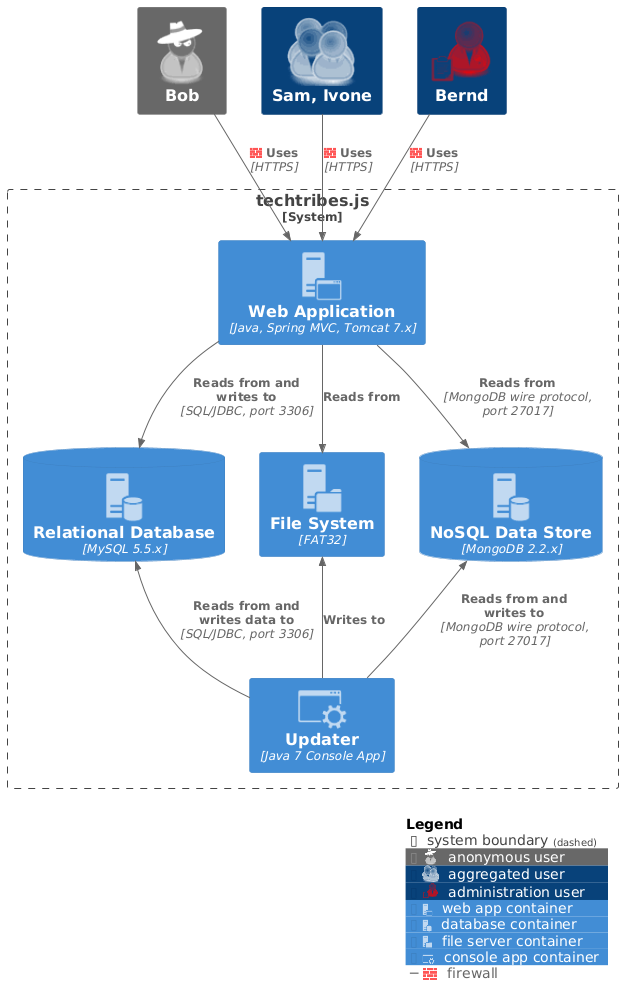
### Sample with tag dependent sprites and custom legend text
|
|
|
|
|
|
```plantuml
|
|
|
@startuml
|
|
|
!include https://raw.githubusercontent.com/plantuml-stdlib/C4-PlantUML/v2.10.0/C4_Container.puml
|
|
|
|
|
|
!define osaPuml https://raw.githubusercontent.com/Crashedmind/PlantUML-opensecurityarchitecture2-icons/master
|
|
|
!include osaPuml/Common.puml
|
|
|
!include osaPuml/User/all.puml
|
|
|
|
|
|
!include <office/Servers/database_server>
|
|
|
!include <office/Servers/file_server>
|
|
|
!include <office/Servers/application_server>
|
|
|
!include <office/Concepts/service_application>
|
|
|
!include <office/Concepts/firewall>
|
|
|
|
|
|
AddExternalPersonTag("anonymous_ext", $sprite="osa_user_black_hat", $legendText="anonymous user")
|
|
|
AddPersonTag("customer", $sprite="osa_user_large_group", $legendText="aggregated user")
|
|
|
AddPersonTag("admin", $sprite="osa_user_audit,color=red", $legendSprite="osa_user_audit,scale=0.25,color=red", $legendText="administration user")
|
|
|
|
|
|
AddContainerTag("webApp", $sprite="application_server", $legendText="web app container")
|
|
|
AddContainerTag("db", $sprite="database_server", $legendText="database container")
|
|
|
AddContainerTag("files", $sprite="file_server", $legendText="file server container")
|
|
|
AddContainerTag("conApp", $sprite="service_application", $legendText="console app container")
|
|
|
|
|
|
AddRelTag("firewall", $textColor="$ARROW_FONT_COLOR", $lineColor="$ARROW_COLOR", $sprite="firewall,scale=0.3,color=red", $legendText="firewall")
|
|
|
|
|
|
Person_Ext(anonymous_user, "Bob", $tags="anonymous_ext")
|
|
|
Person(aggregated_user, "Sam, Ivone", $tags="customer")
|
|
|
Person(administration_user, "Bernd", $tags="admin")
|
|
|
|
|
|
System_Boundary(c1, "techtribes.js"){
|
|
|
Container(web_app, "Web Application", "Java, Spring MVC, Tomcat 7.x", $tags="webApp")
|
|
|
ContainerDb(rel_db, "Relational Database", "MySQL 5.5.x", $tags="db")
|
|
|
Container(filesystem, "File System", "FAT32", $tags="files")
|
|
|
ContainerDb(nosql, "NoSQL Data Store", "MongoDB 2.2.x", $tags="db")
|
|
|
Container(updater, "Updater", "Java 7 Console App", $tags="conApp")
|
|
|
}
|
|
|
|
|
|
Rel(anonymous_user, web_app, "Uses", "HTTPS", $tags="firewall")
|
|
|
Rel(aggregated_user, web_app, "Uses", "HTTPS", $tags="firewall")
|
|
|
Rel(administration_user, web_app, "Uses", "HTTPS", $tags="firewall")
|
|
|
|
|
|
Rel(web_app, rel_db, "Reads from and writes to", "SQL/JDBC, port 3306")
|
|
|
Rel(web_app, filesystem, "Reads from")
|
|
|
Rel(web_app, nosql, "Reads from", "MongoDB wire protocol, port 27017")
|
|
|
|
|
|
Rel_U(updater, rel_db, "Reads from and writes data to", "SQL/JDBC, port 3306")
|
|
|
Rel_U(updater, filesystem, "Writes to")
|
|
|
Rel_U(updater, nosql, "Reads from and writes to", "MongoDB wire protocol, port 27017")
|
|
|
|
|
|
Lay_R(rel_db, filesystem)
|
|
|
|
|
|
SHOW_LEGEND()
|
|
|
@enduml
|
|
|
```
|
|
|
|
|
|
|
|
|
|
|
|
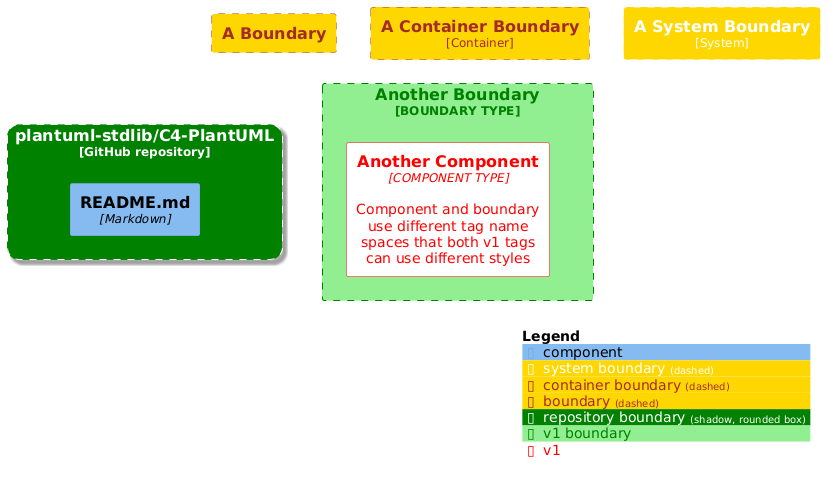
### Sample with different boundary tag combinations
|
|
|
|
|
|
```plantuml
|
|
|
@startuml
|
|
|
!include https://raw.githubusercontent.com/plantuml-stdlib/C4-PlantUML/v2.10.0/C4_Component.puml
|
|
|
|
|
|
' Update the generic boundary style and the "system", "enterprise", "container" boundaries styles too
|
|
|
UpdateBoundaryStyle($bgColor="gold", $fontColor="brown", $borderColor="brown")
|
|
|
' (Re-)Updates the system boundary styles; re-set $bgColor avoids '(no back color)' in legend too
|
|
|
UpdateSystemBoundaryStyle($bgColor="gold", $fontColor="white", $borderColor="white")
|
|
|
|
|
|
Boundary(b, "A Boundary") {
|
|
|
}
|
|
|
|
|
|
Container_Boundary(cb, "A Container Boundary") {
|
|
|
}
|
|
|
|
|
|
System_Boundary(sb, "A System Boundary") {
|
|
|
}
|
|
|
|
|
|
' defines a new border style incl. new border type
|
|
|
AddBoundaryTag("repository", $bgColor="green", $fontColor="white", $borderColor="white", $shadowing="true", $shape = RoundedBoxShape(), $type="GitHub repository")
|
|
|
|
|
|
Boundary(c4Respository, "plantuml-stdlib/C4-PlantUML", $tags="repository") {
|
|
|
Component(readMe, "README.md", "Markdown")
|
|
|
}
|
|
|
|
|
|
' boundary tags are internally extended with '_boundary' that it uses a different name space
|
|
|
' this enables different element and boundary styles for the same tag name
|
|
|
AddBoundaryTag("v1", $bgColor="lightgreen", $fontColor="green", $borderColor="green")
|
|
|
AddElementTag("v1", $bgColor="lightred", $fontColor="red", $borderColor="red")
|
|
|
|
|
|
Boundary(anotherBoundary, "Another Boundary", $type="BOUNDARY TYPE", $tags="v1") {
|
|
|
Component(anotherComponent, "Another Component", $techn="COMPONENT TYPE", $tags="v1", $descr="Component and boundary use different tag name spaces that both v1 tags can use different styles")
|
|
|
}
|
|
|
|
|
|
Lay_R(b, cb)
|
|
|
Lay_R(cb, sb)
|
|
|
|
|
|
Lay_D(b, c4Respository)
|
|
|
|
|
|
Lay_R(c4Respository, anotherBoundary)
|
|
|
|
|
|
SHOW_LEGEND()
|
|
|
@enduml
|
|
|
```
|
|
|
|
|
|
|
|
|
|
|
|
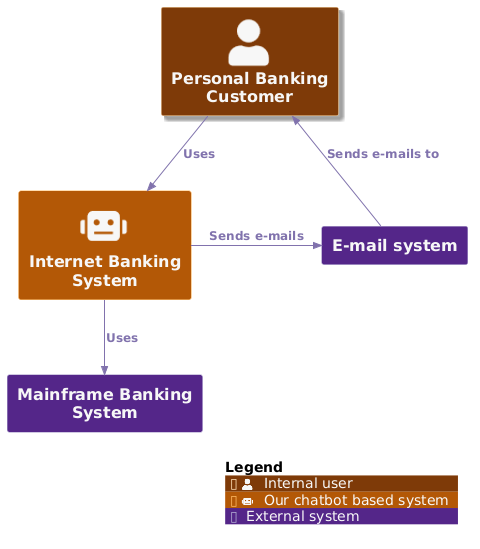
### Custom schema definitions (via UpdateElementStyle())
|
|
|
|
|
|
Via `UpdateElementStyle()` calls, it is possible to change the default colors, sprites, legend text, tags, ...
|
|
|
It automatically updates the legend too.
|
|
|
If the corresponding section is stored in a separate file then it can be reused as default of all diagrams.
|
|
|
|
|
|
```plantuml
|
|
|
@startuml
|
|
|
!include https://raw.githubusercontent.com/plantuml-stdlib/C4-PlantUML/v2.10.0/C4_Context.puml
|
|
|
|
|
|
' <<<<< this section could be stored in a separate file and reused in all other diagrams too
|
|
|
' it defines new default colors, different default sprites and legend
|
|
|
!$COLOR_A_5 = "#7f3b08"
|
|
|
!$COLOR_A_4 = "#b35806"
|
|
|
!$COLOR_A_3 = "#e08214"
|
|
|
!$COLOR_A_2 = "#fdb863"
|
|
|
!$COLOR_A_1 = "#fee0b6"
|
|
|
!$COLOR_NEUTRAL = "#f7f7f7"
|
|
|
!$COLOR_B_1 = "#d8daeb"
|
|
|
!$COLOR_B_2 = "#b2abd2"
|
|
|
!$COLOR_B_3 = "#8073ac"
|
|
|
!$COLOR_B_4 = "#542788"
|
|
|
!$COLOR_B_5 = "#2d004b"
|
|
|
!$COLOR_REL_LINE = "#8073ac"
|
|
|
!$COLOR_REL_TEXT = "#8073ac"
|
|
|
|
|
|
UpdateElementStyle("person", $bgColor=$COLOR_A_5, $fontColor=$COLOR_NEUTRAL, $borderColor=$COLOR_A_1, $shadowing="true", $legendText="Internal user")
|
|
|
UpdateElementStyle("external_person", $bgColor=$COLOR_B_5, $fontColor=$COLOR_NEUTRAL, $borderColor=$COLOR_B_1, $legendText="External user")
|
|
|
UpdateElementStyle("system", $bgColor=$COLOR_A_4, $fontColor=$COLOR_NEUTRAL, $borderColor=$COLOR_A_2, $sprite="robot", $legendText="Our chatbot based system")
|
|
|
UpdateElementStyle("external_system", $bgColor=$COLOR_B_4, $fontColor=$COLOR_NEUTRAL, $borderColor=$COLOR_B_2, $legendText="External system")
|
|
|
UpdateRelStyle($lineColor=$COLOR_REL_LINE, $textColor=$COLOR_REL_TEXT)
|
|
|
' >>>>> end of section
|
|
|
|
|
|
Person(customer, "Personal Banking Customer")
|
|
|
System(banking_system, "Internet Banking System")
|
|
|
|
|
|
System_Ext(mail_system, "E-mail system")
|
|
|
System_Ext(mainframe, "Mainframe Banking System")
|
|
|
|
|
|
Rel(customer, banking_system, "Uses")
|
|
|
Rel_Back(customer, mail_system, "Sends e-mails to")
|
|
|
Rel_Neighbor(banking_system, mail_system, "Sends e-mails")
|
|
|
Rel(banking_system, mainframe, "Uses")
|
|
|
|
|
|
SHOW_LEGEND()
|
|
|
@enduml
|
|
|
```
|
|
|
|
|
|
|
|
|
|
|
|
## Element and Relationship properties
|
|
|
|
|
|
A model can be extended with (a table of) properties that concrete deployments or more detailed concepts can be documented:
|
|
|
|
|
|
- `SetPropertyHeader(col1Name, ?col2Name, ?col3Name, ?col4Name)`
|
|
|
The properties table can have up to 4 columns. The default header uses the column names "Name", "Description".
|
|
|
- `WithoutPropertyHeader()`
|
|
|
If no header is used, then the second column is bold.
|
|
|
- `AddProperty(col1, ?col2, ?col3, ?col4)`
|
|
|
(All columns of) a property which will be added to the next element.
|
|
|
|
|
|
Following sample uses all 3 different property definitions (and the aligned deployment node).
|
|
|
|
|
|
```plantuml
|
|
|
@startuml
|
|
|
!include https://raw.githubusercontent.com/plantuml-stdlib/C4-PlantUML/v2.10.0/C4_Deployment.puml
|
|
|
|
|
|
' default header Property, Value
|
|
|
AddProperty("Name", "Flash")
|
|
|
AddProperty("Organization", "Zootopia")
|
|
|
AddProperty("Tool", "Internet Explorer 7.0")
|
|
|
Person(personAlias, "Label", "Optional Description (with default property header)")
|
|
|
|
|
|
SetPropertyHeader("Property","Value", "Description")
|
|
|
AddProperty("Prop1", "Value1", "Details1")
|
|
|
AddProperty("Prop2", "Value2", "Details2")
|
|
|
Deployment_Node_L(nodeAlias, "Label", "Optional Type", "Optional Description (with custom property header)") {
|
|
|
|
|
|
WithoutPropertyHeader()
|
|
|
AddProperty("PropC1", "ValueC1")
|
|
|
AddProperty("PropC2", "ValueC2")
|
|
|
Container(containerAlias, "Label", "Technology", "Optional Description (without property header)")
|
|
|
}
|
|
|
|
|
|
System(systemAlias, "Label", "Optional Description (without properties)")
|
|
|
|
|
|
' starting with v.2.5.0 relationships support properties too
|
|
|
WithoutPropertyHeader()
|
|
|
AddProperty("PropC1", "ValueC1")
|
|
|
AddProperty("PropC2", "ValueC2")
|
|
|
Rel(personAlias, containerAlias, "Label", "Optional Technology", "Optional Description")
|
|
|
@enduml
|
|
|
```
|
|
|
|
|
|
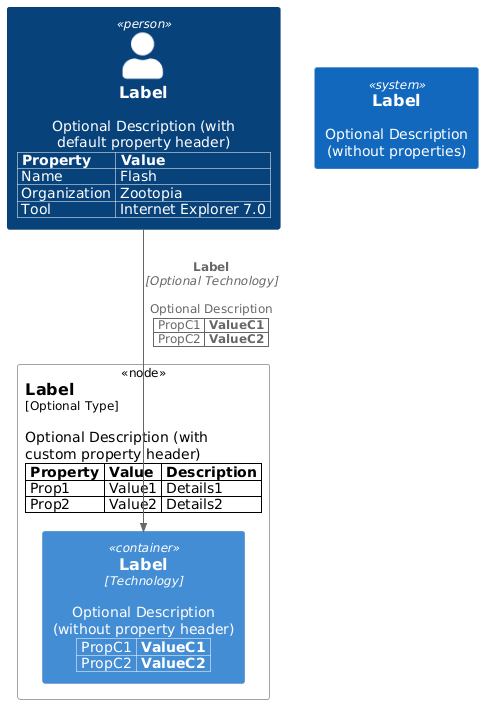
|
|
|
|
|
|
## Version information
|
|
|
|
|
|
C4-PlantUML offers version information like PlantUML with its `%version()` call.
|
|
|
|
|
|
- `C4Version()`: Current C4-PlantUML version (e.g. `2.4.0beta1`).
|
|
|
- `C4VersionDetails()`: (Floating) version details with the current PlantUML and C4-PlantUML version. (It can be referenced via the alias `C4VersionDetailsArea`.)
|
|
|
|
|
|
```plantuml
|
|
|
@startuml
|
|
|
!include https://raw.githubusercontent.com/plantuml-stdlib/C4-PlantUML/v2.10.0/C4_Container.puml
|
|
|
|
|
|
' existing plantuml version as text
|
|
|
%version()
|
|
|
|
|
|
' new C4-Plantuml version as text
|
|
|
C4Version()
|
|
|
|
|
|
' new C4-Plantuml version details (incl. PlantUML version) as table
|
|
|
C4VersionDetails()
|
|
|
|
|
|
' version functions used in e.g. footer
|
|
|
footer drawn with PlantUML v. %version() and C4-PlantUML v. C4Version()
|
|
|
@enduml
|
|
|
```
|
|
|
|
|
|

|
|
|
|
|
|
## Snippets for Visual Studio Code
|
|
|
|
|
|
Because the PlantUML support inside of Visual Studio Code is excellent with the [PlantUML extension](https://marketplace.visualstudio.com/items?itemName=jebbs.plantuml), you can also find VS Code snippets for C4-PlantUML at [.vscode/C4.code-snippets](.vscode/C4.code-snippets).
|
|
|
|
|
|
Project level snippets are now supported in [VSCode 1.28](https://code.visualstudio.com/updates/v1_28#_project-level-snippets).
|
|
|
Just include the `C4.code-snippets` file in the `.vscode` folder of your project.
|
|
|
|
|
|
It is possible to save them directly inside VS Code: [Creating your own snippets](https://code.visualstudio.com/docs/editor/userdefinedsnippets#_creating-your-own-snippets).
|
|
|
|
|
|

|
|
|
|
|
|
## Live Templates for IntelliJ
|
|
|
|
|
|
### Prerequisites
|
|
|
|
|
|
[Graphviz download](https://graphviz.gitlab.io/download/)
|
|
|
[PlantUML Integration](https://plugins.jetbrains.com/plugin/7017-plantuml-integration)
|
|
|
|
|
|
### Install
|
|
|
|
|
|
1. Download [IntelliJ live template](intellij/c4_live_template.zip).
|
|
|
2. Select `File | Manage IDE Settings | Import Settings` from the IntelliJ IDEA menu.
|
|
|
3. Specify the path to the downloaded ZIP file: `c4_live_template.zip`.
|
|
|
4. In the Import Settings dialog, select the Live templates checkbox and click OK.
|
|
|
5. Restart IntelliJ.
|
|
|
|
|
|
### Usage
|
|
|
|
|
|
- Create new PlantUML file (.puml).
|
|
|
- Type `c4_` for displaying artifacts templates for C4-PlantUML
|
|
|
- Live template create correct C4 model artifact with stubbed arguments.
|
|
|
- E.g. alias, label, type, technology, description
|
|
|
- Replace stubbed arguments with desired values.
|
|
|
|
|
|

|
|
|

|
|
|
|
|
|
## Advanced Samples
|
|
|
|
|
|
The following advanced samples are reproductions with C4-PlantUML from official [C4 model samples](https://c4model.com/#examples) created by [Simon Brown](https://simonbrown.je/).
|
|
|
|
|
|
The core diagram samples from [c4model.com](https://c4model.com/#coreDiagrams) are available [here](samples/C4CoreDiagrams.md).
|
|
|
|
|
|
### techtribes.js
|
|
|
|
|
|
Source: [C4_Container Diagram Sample - techtribesjs.puml](samples/C4_Container%20Diagram%20Sample%20-%20techtribesjs.puml)
|
|
|
|
|
|
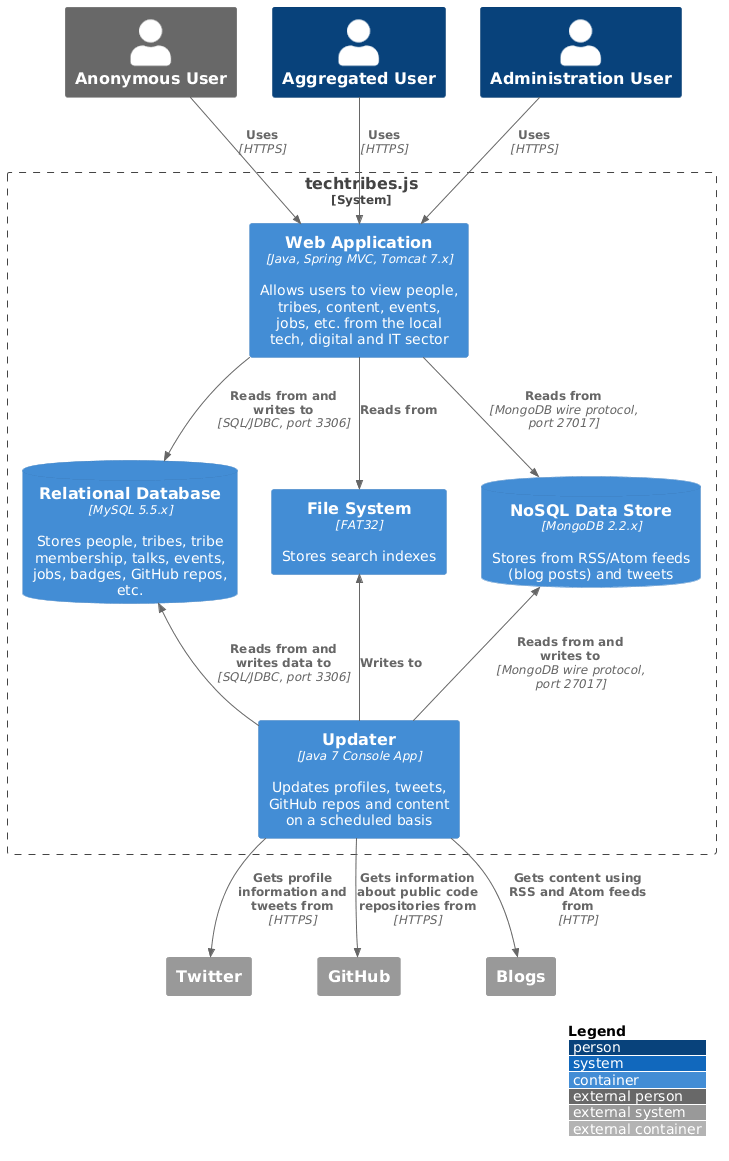
|
|
|
|
|
|
### Message Bus and Microservices
|
|
|
|
|
|
Source: [C4_Container Diagram Sample - message bus.puml](samples/C4_Container%20Diagram%20Sample%20-%20message%20bus.puml)
|
|
|
|
|
|
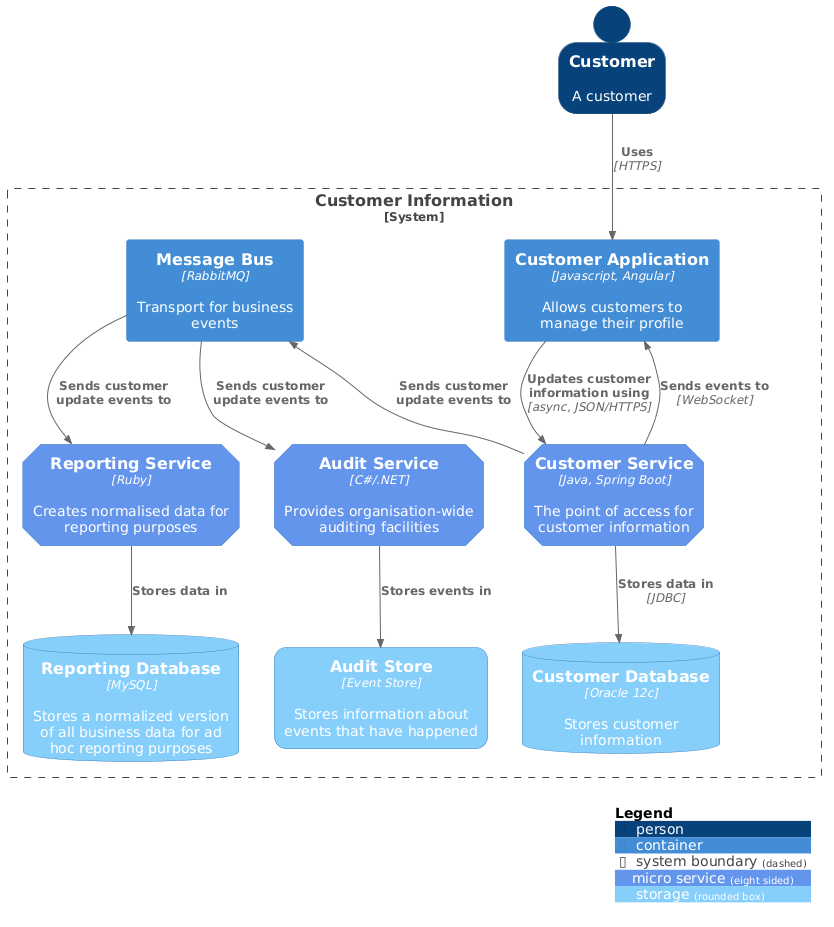
|
|
|
|
|
|
### (C4 styled) Sequence diagram
|
|
|
|
|
|
TODO: better sample is missing ...
|
|
|
|
|
|
Source: [C4_Sequence Diagram Sample - complex.puml](samples/C4_Sequence%20Diagram%20Sample%20-%20complex.puml)
|
|
|
|
|
|
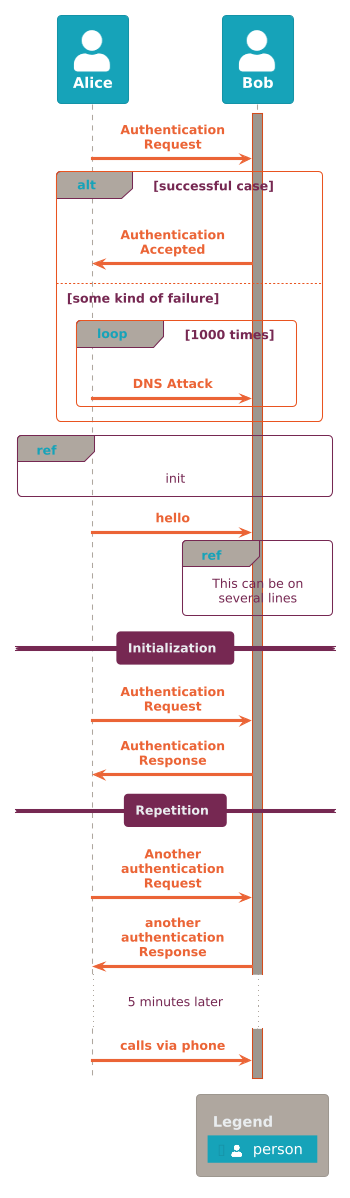
|
|
|
|
|
|
## Background
|
|
|
|
|
|
[PlantUML](https://plantuml.com/) is an open source project that allows you to create UML diagrams.
|
|
|
Diagrams are defined using a simple and intuitive language.
|
|
|
Images can be generated in PNG, in SVG or in LaTeX format.
|
|
|
|
|
|
PlantUML was created to allow the drawing of UML diagrams, using a simple and human readable text description.
|
|
|
Because it does not prevent you from drawing inconsistent diagrams, it is a drawing tool and not a modeling tool.
|
|
|
It is the most used text-based diagram drawing tool with [extensive support into wikis and forums, text editors and IDEs, use by different programming languages and documentation generators](https://plantuml.com/running).
|
|
|
|
|
|
The [C4 model](https://c4model.com/) for software architecture is an "abstraction-first" approach to diagramming, based upon abstractions that reflect how software architects and developers think about and build software.
|
|
|
The small set of abstractions and diagram types makes the C4 model easy to learn and use.
|
|
|
C4 stands for context, containers, components, and code — a set of hierarchical diagrams that you can use to describe your software architecture at different zoom levels, each useful for different audiences.
|
|
|
|
|
|
The C4 model was created as a way to help software development teams describe and communicate software architecture, both during up-front design sessions and when retrospectively documenting an existing codebase.
|
|
|
|
|
|
More information can be found here:
|
|
|
|
|
|
- [The C4 model for software architecture](https://c4model.com/)
|
|
|
- [REAL WORLD PlantUML - Sample Gallery](https://real-world-plantuml.com/)
|
|
|
- [Visualising and documenting software architecture cheat sheets](https://www.codingthearchitecture.com/2017/04/27/visualising_and_documenting_software_architecture_cheat_sheets.html)
|
|
|
- [PlantUML and Structurizr - Create models not diagrams](https://www.codingthearchitecture.com/2016/12/08/plantuml_and_structurizr.html)
|
|
|
|
|
|
## License
|
|
|
|
|
|
This project is licensed under the MIT License - see the [LICENSE](LICENSE) file for details
|