You cannot select more than 25 topics
Topics must start with a letter or number, can include dashes ('-') and can be up to 35 characters long.
247 lines
35 KiB
Markdown
247 lines
35 KiB
Markdown
# C4-PlantUML
|
|
|
|

|
|
|
|
C4-PlantUML combines the benefits of [PlantUML](http://en.plantuml.com/) and the [C4 model](https://c4model.com/) for providing a simple way of describing and communicate software architectures - especially during up-front design sessions - with an intuitive language using open source and platform independent tools.
|
|
|
|
C4-PlantUML includes macros, stereotypes, and other goodies (like VSCode Snippets) for creating C4 diagrams with PlantUML.
|
|
|
|
* [Getting Started](#getting-started)
|
|
* [Snippets for Visual Studio Code](#snipptes-for-visual-studio-code)
|
|
* [Layout Options](#layout-options)
|
|
* [LAYOUT_TOP_DOWN or LAYOUT_LEFT_RIGHT](#layout_top_down-or-layout_left_right)
|
|
* [LAYOUT_WITH_LEGEND](#layout_with_legend)
|
|
* [LAYOUT_AS_SKETCH](#layout_as_sketch)
|
|
* [Advanced Samples](#advanced-samples)
|
|
* [Background](#background)
|
|
* [License](#license)
|
|
|
|
## Getting Started
|
|
|
|
At the top of your C4 PlantUML `.puml` file, you need to include the `C4_Context.puml`, `C4_Container.puml` or `C4_Component.puml` file found in the `root` of this repo.
|
|
|
|
To be independent of any internet connectifity, you can also download the files found in the `root` and reference it locally with
|
|
|
|
```c#
|
|
!include path/to/C4_Container.puml
|
|
```
|
|
|
|
Just remember to change the `!include` statements inside the top of the files.
|
|
|
|
If you want to use the always up-to-date version in this repo, use the following:
|
|
|
|
```c#
|
|
!includeurl https://raw.githubusercontent.com/RicardoNiepel/C4-PlantUML/master/C4_Container.puml
|
|
```
|
|
|
|
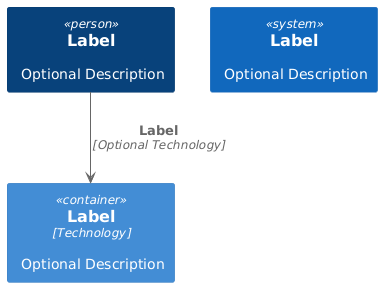
After you have inlcluded `C4_Container.puml` you can use the defined macro definitions for the C4 elements: `Person`, `Person_Ext`, `System`, `System_Ext`, `Container`, `Component`, `Relationship`, `Boundary`, `System_Boundary`, `Container_Boundary`.
|
|
|
|
```csharp
|
|
@startuml C4_Elements
|
|
!includeurl https://raw.githubusercontent.com/RicardoNiepel/C4-PlantUML/master/C4_Container.puml
|
|
|
|
Person(personAlias, "Label", "Optional Description")
|
|
Container(containerAlias, "Label", "Technology", "Optional Description")
|
|
System(systemAlias, "Label", "Optional Description")
|
|
|
|
Rel(personAlias, containerAlias, "Label", "Optional Technology")
|
|
@enduml
|
|
```
|
|
|
|
|
|
|
|
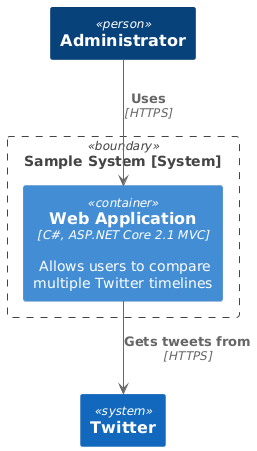
In addition to this, it is also possible to define a system or component boundary.
|
|
|
|
Take a look a look at the following sample of a C4 Container Diagram:
|
|
|
|
```csharp
|
|
@startuml Basic Sample
|
|
!includeurl https://raw.githubusercontent.com/RicardoNiepel/C4-PlantUML/master/C4_Container.puml
|
|
|
|
Person(admin, "Administrator")
|
|
System_Boundary(c1, "Sample System") {
|
|
Container(web_app, "Web Application", "C#, ASP.NET Core 2.1 MVC", "Allows users to compare multiple Twitter timelines")
|
|
}
|
|
System(twitter, "Twitter")
|
|
|
|
Rel(admin, web_app, "Uses", "HTTPS")
|
|
Rel(web_app, twitter, "Gets tweets from", "HTTPS")
|
|
@enduml
|
|
```
|
|
|
|
|
|
|
|
## Snippets for Visual Studio Code
|
|
|
|
Because the PlantUML support inside of Visual Studio Code is excellent with the [PlantUML extension](https://marketplace.visualstudio.com/items?itemName=jebbs.plantuml), you can also find VS Code snippets for C4-PlantUML at [.vscode/C4.code-snippets](.vscode/C4.code-snippets).
|
|
|
|
Project level snippets are now supported in [VSCode 1.28](https://code.visualstudio.com/updates/v1_28#_project-level-snippets).
|
|
Just include the `C4.code-snippets` file in the `.vscode` folder of your project.
|
|
|
|
It is possible to save them directly inside VS Code: [Creating your own snippets](https://code.visualstudio.com/docs/editor/userdefinedsnippets#_creating-your-own-snippets).
|
|
|
|

|
|
|
|
## Layout Options
|
|
|
|
PlantUML uses [Graphviz](https://www.graphviz.org/) for his graph visualization. Thus the rendering itself is done automatically for you - that it one of the biggest advantages of using PlantUML.
|
|
|
|
...and also sometimes one of the biggest disadvantages, if the rendering is not what the user intended.
|
|
|
|
For this reason, C4-PlantUML also comes with some layout options.
|
|
|
|
### LAYOUT_TOP_DOWN or LAYOUT_LEFT_RIGHT
|
|
|
|
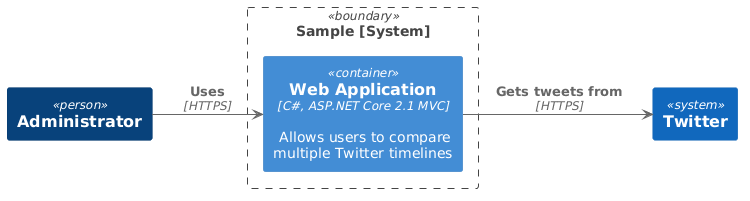
With the two macros `LAYOUT_TOP_DOWN` and `LAYOUT_LEFT_RIGHT` it is possible to easily change the flow visualization of the diagram. `LAYOUT_TOP_DOWN` is the default.
|
|
|
|
```csharp
|
|
@startuml LAYOUT_TOP_DOWN Sample
|
|
!includeurl https://raw.githubusercontent.com/RicardoNiepel/C4-PlantUML/master/C4_Container.puml
|
|
|
|
/' Not needed because this is the default '/
|
|
LAYOUT_TOP_DOWN
|
|
|
|
Person(admin, "Administrator")
|
|
System_Boundary(c1, 'Sample') {
|
|
Container(web_app, "Web Application", "C#, ASP.NET Core 2.1 MVC", "Allows users to compare multiple Twitter timelines")
|
|
}
|
|
System(twitter, "Twitter")
|
|
|
|
Rel(admin, web_app, "Uses", "HTTPS")
|
|
Rel(web_app, twitter, "Gets tweets from", "HTTPS")
|
|
@enduml
|
|
```
|
|
|
|

|
|
|
|
Using `LAYOUT_LEFT_RIGHT`
|
|
|
|
```csharp
|
|
@startuml LAYOUT_LEFT_RIGHT Sample
|
|
!includeurl https://raw.githubusercontent.com/RicardoNiepel/C4-PlantUML/master/C4_Container.puml
|
|
|
|
LAYOUT_LEFT_RIGHT
|
|
|
|
Person(admin, "Administrator")
|
|
System_Boundary(c1, 'Sample') {
|
|
Container(web_app, "Web Application", "C#, ASP.NET Core 2.1 MVC", "Allows users to compare multiple Twitter timelines")
|
|
}
|
|
System(twitter, "Twitter")
|
|
|
|
Rel(admin, web_app, "Uses", "HTTPS")
|
|
Rel(web_app, twitter, "Gets tweets from", "HTTPS")
|
|
@enduml
|
|
```
|
|
|
|
|
|
|
|
### LAYOUT_WITH_LEGEND
|
|
|
|
Colors can help to add additional information or simply to make the diagram more aesthetically pleasing.
|
|
It can also help to save some space.
|
|
|
|
All of that is the reason, C4-PlantUML uses colors and prefer also to enable a layout without `<<stereotypes>>` and with a legend.
|
|
This can be enabled with `LAYOUT_WITH_LEGEND`.
|
|
|
|
```csharp
|
|
@startuml LAYOUT_WITH_LEGEND Sample
|
|
!includeurl https://raw.githubusercontent.com/RicardoNiepel/C4-PlantUML/master/C4_Container.puml
|
|
|
|
LAYOUT_WITH_LEGEND
|
|
|
|
Person(admin, "Administrator")
|
|
System_Boundary(c1, 'Sample') {
|
|
Container(web_app, "Web Application", "C#, ASP.NET Core 2.1 MVC", "Allows users to compare multiple Twitter timelines")
|
|
}
|
|
System(twitter, "Twitter")
|
|
|
|
Rel(admin, web_app, "Uses", "HTTPS")
|
|
Rel(web_app, twitter, "Gets tweets from", "HTTPS")
|
|
@enduml
|
|
```
|
|
|
|

|
|
|
|
### LAYOUT_AS_SKETCH
|
|
|
|
C4-PlantUML can be especially helpful during up-front design sessions.
|
|
One thing which is often ignored is the fact, that these software architecture sketches are just sketches.
|
|
|
|
Without any proof
|
|
|
|
* if they are technically possible
|
|
* if they can fullfil all requirements
|
|
* if they keep what they promise
|
|
|
|
More often these sketches are used by many people as facts and are manifested into their documentations.
|
|
With `LAYOUT_AS_SKETCH` you can make a difference.
|
|
|
|
```csharp
|
|
@startuml LAYOUT_AS_SKETCH Sample
|
|
!includeurl https://raw.githubusercontent.com/RicardoNiepel/C4-PlantUML/master/C4_Container.puml
|
|
|
|
LAYOUT_AS_SKETCH
|
|
|
|
Person(admin, "Administrator")
|
|
System_Boundary(c1, 'Sample') {
|
|
Container(web_app, "Web Application", "C#, ASP.NET Core 2.1 MVC", "Allows users to compare multiple Twitter timelines")
|
|
}
|
|
System(twitter, "Twitter")
|
|
|
|
Rel(admin, web_app, "Uses", "HTTPS")
|
|
Rel(web_app, twitter, "Gets tweets from", "HTTPS")
|
|
@enduml
|
|
```
|
|
|
|

|
|
|
|
## Advanced Samples
|
|
|
|
The following advanced samples are reproductions with C4-PlantUML from official [C4 model samples](https://c4model.com/#examples) created by [Simon Brown](http://simonbrown.je/).
|
|
|
|
The core diagram samples from [c4model.com](https://c4model.com/#coreDiagrams) are available [here](samples/C4model.com/README.md).
|
|
|
|
### techtribes.js
|
|
|
|
Source: [C4_Container Diagram Sample - techtribesjs.puml](samples/C4_Container%20Diagram%20Sample%20-%20techtribesjs.puml)
|
|
|
|

|
|
|
|
### Message Bus and Microservices
|
|
|
|
Source: [C4_Container Diagram Sample - message bus.puml](samples/C4_Container%20Diagram%20Sample%20-%20message%20bus.puml)
|
|
|
|

|
|
|
|
### Big Bank plc
|
|
|
|
Source: [C4_Container Diagram Sample - bigbankplc.puml](samples/C4_Container%20Diagram%20Sample%20-%20bigbankplc.puml)
|
|
|
|

|
|
|
|
## Background
|
|
|
|
[PlantUML](http://en.plantuml.com/) is an open source project that allows you to create UML diagrams.
|
|
Diagrams are defined using a simple and intuitive language.
|
|
Images can be generated in PNG, in SVG or in LaTeX format.
|
|
|
|
PlantUML was created to allow the drawing of UML diagrams, using a simple and human readable text description.
|
|
Because it does not prevent you from drawing inconsistent diagrams, it is a drawing tool and not a modeling tool.
|
|
It is the most used text-based diagram drawing tool with [extensive support into wikis and forums, text editors and IDEs, use by different programming languages and documentation generators](http://en.plantuml.com/running).
|
|
|
|
The [C4 model](https://c4model.com/) for software architecture is an "abstraction-first" approach to diagramming, based upon abstractions that reflect how software architects and developers think about and build software.
|
|
The small set of abstractions and diagram types makes the C4 model easy to learn and use.
|
|
C4 stands for context, containers, components, and code — a set of hierarchical diagrams that you can use to describe your software architecture at different zoom levels, each useful for different audiences.
|
|
|
|
The C4 model was created as a way to help software development teams describe and communicate software architecture, both during up-front design sessions and when retrospectively documenting an existing codebase.
|
|
|
|
More information can be found here:
|
|
|
|
* [The C4 model for software architecture](https://c4model.com/)
|
|
* [REAL WORLD PlantUML - Sample Gallery](https://real-world-plantuml.com/)
|
|
* [Visualising and documenting software architecture cheat sheets](http://www.codingthearchitecture.com/2017/04/27/visualising_and_documenting_software_architecture_cheat_sheets.html)
|
|
* [PlantUML and Structurizr - Create models not diagrams](http://www.codingthearchitecture.com/2016/12/08/plantuml_and_structurizr.html)
|
|
|
|
## License
|
|
|
|
This project is licensed under the MIT License - see the [LICENSE](LICENSE) file for details |