|
|
# C4-PlantUML
|
|
|
|
|
|
|
|
|
|
|
|
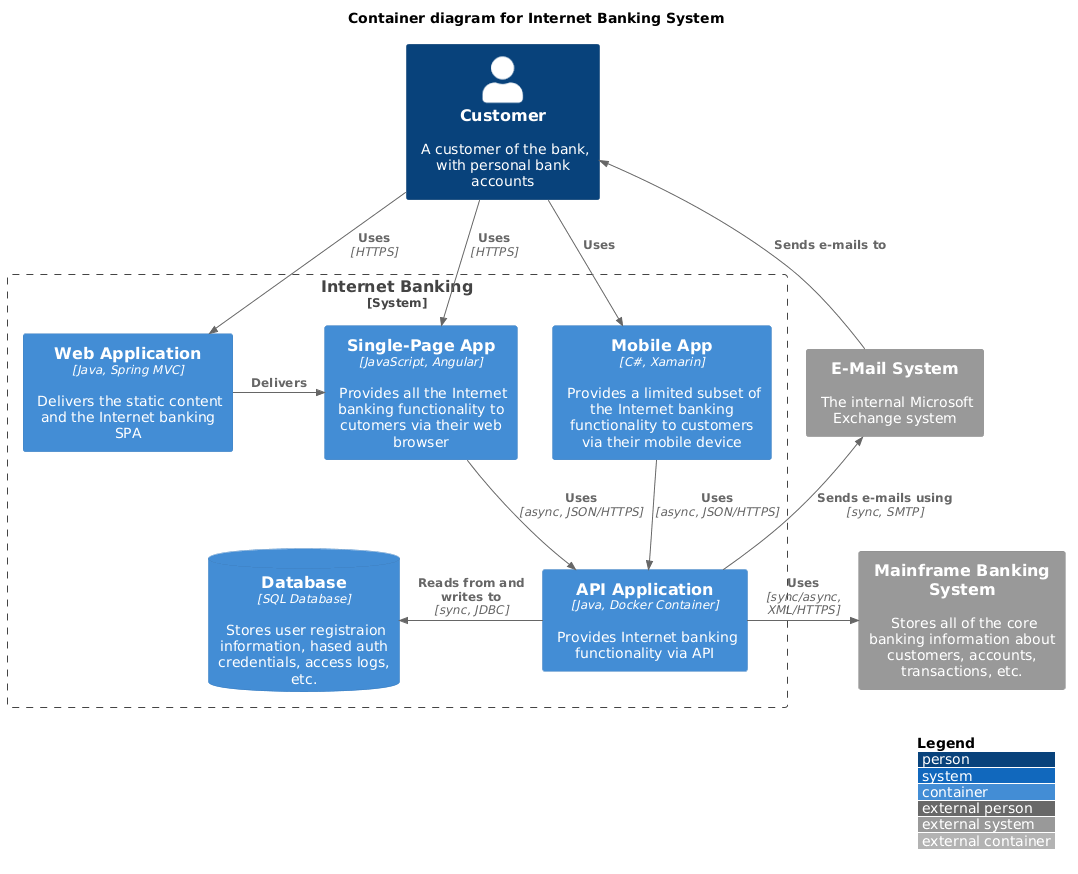
C4-PlantUML combines the benefits of [PlantUML](https://plantuml.com/) and the [C4 model](https://c4model.com/) for providing a simple way of describing and communicate software architectures – especially during up-front design sessions – with an intuitive language using open source and platform independent tools.
|
|
|
|
|
|
C4-PlantUML includes macros, stereotypes, and other goodies (like VSCode Snippets) for creating C4 diagrams with PlantUML.
|
|
|
|
|
|
* [Getting Started](#getting-started)
|
|
|
* [Supported Diagram Types](#supported-diagram-types)
|
|
|
* [Snippets for Visual Studio Code](#snippets-for-visual-studio-code)
|
|
|
* [Layout Options](#layout-options)
|
|
|
* [Samples](#advanced-samples)
|
|
|
* [Background](#background)
|
|
|
* [License](#license)
|
|
|
|
|
|
## Getting Started
|
|
|
|
|
|
At the top of your C4 PlantUML `.puml` file, you need to include the `C4_Context.puml`, `C4_Container.puml` or `C4_Component.puml` file found in the `root` of this repo.
|
|
|
|
|
|
To be independent of any internet connectivity, you can also download the files found in the `root` and activate the local conversion with additional command line argument `-DRELATIVE_INCLUDE="."` (that the local files are included)
|
|
|
|
|
|
```csharp
|
|
|
java -jar plantuml.jar -DRELATIVE_INCLUDE="." ...
|
|
|
```
|
|
|
|
|
|
If you want to use the always up-to-date version in this repo, use the following:
|
|
|
|
|
|
```csharp
|
|
|
!include https://raw.githubusercontent.com/plantuml-stdlib/C4-PlantUML/master/C4_Container.puml
|
|
|
```
|
|
|
|
|
|
Now let's create a C4 Container diagram:
|
|
|
|
|
|
\(If you don't want run PlantUML locally you can use e.g. the [PlantUML Web Server](https://www.plantuml.com/plantuml/uml/ZOxDIWGn48JlUOeufn5qSjcJfvNHsugBFsV99iqcsEc4T0VTjpSCE2AYUAeAgVwgjYosIakevytBBK824bPdaHms3pg85BuofjgtwHWbj4DZg2wJzDpaSZAliRh04ioykToZ9Nc-snbux_yUlEdGkOTj9AXJwJLAxQ5ofh4iSetHyeKUTlO0E7HpNoHcigXlW5sDosiuLojaT9_kn-aJk40Py_7q1-Znn09fv4N-swuU0ByFNbVyZlYQqmbR8DyIVW00) too.)
|
|
|
|
|
|
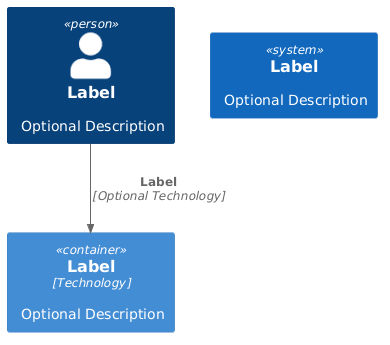
After you have included `C4_Container.puml` you can use the defined macro definitions for the C4 elements: `Person`, `Person_Ext`, `System`, `System_Ext`, `Container`, `Relationship`, `Boundary`, and `System_Boundary`
|
|
|
|
|
|
```csharp
|
|
|
@startuml C4_Elements
|
|
|
!include https://raw.githubusercontent.com/plantuml-stdlib/C4-PlantUML/master/C4_Container.puml
|
|
|
|
|
|
Person(personAlias, "Label", "Optional Description")
|
|
|
Container(containerAlias, "Label", "Technology", "Optional Description")
|
|
|
System(systemAlias, "Label", "Optional Description")
|
|
|
|
|
|
Rel(personAlias, containerAlias, "Label", "Optional Technology")
|
|
|
@enduml
|
|
|
```
|
|
|
|
|
|
|
|
|
|
|
|
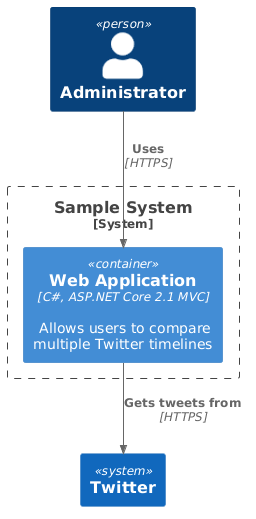
In addition to this, it is also possible to define a system or component boundary.
|
|
|
|
|
|
Take a look at the following sample of a C4 Container Diagram:
|
|
|
|
|
|
```csharp
|
|
|
@startuml Basic Sample
|
|
|
!include https://raw.githubusercontent.com/plantuml-stdlib/C4-PlantUML/master/C4_Container.puml
|
|
|
|
|
|
Person(admin, "Administrator")
|
|
|
System_Boundary(c1, "Sample System") {
|
|
|
Container(web_app, "Web Application", "C#, ASP.NET Core 2.1 MVC", "Allows users to compare multiple Twitter timelines")
|
|
|
}
|
|
|
System(twitter, "Twitter")
|
|
|
|
|
|
Rel(admin, web_app, "Uses", "HTTPS")
|
|
|
Rel(web_app, twitter, "Gets tweets from", "HTTPS")
|
|
|
@enduml
|
|
|
```
|
|
|
|
|
|
|
|
|
|
|
|
Entities can also be decorated with icons using the last parameter, for example:
|
|
|
|
|
|
```csharp
|
|
|
@startuml
|
|
|
!include https://raw.githubusercontent.com/plantuml-stdlib/C4-PlantUML/master/C4_Container.puml
|
|
|
|
|
|
!define DEVICONS https://raw.githubusercontent.com/tupadr3/plantuml-icon-font-sprites/master/devicons
|
|
|
!define FONTAWESOME https://raw.githubusercontent.com/tupadr3/plantuml-icon-font-sprites/master/font-awesome-5
|
|
|
!include DEVICONS/angular.puml
|
|
|
!include DEVICONS/java.puml
|
|
|
!include DEVICONS/msql_server.puml
|
|
|
!include FONTAWESOME/users.puml
|
|
|
|
|
|
LAYOUT_WITH_LEGEND()
|
|
|
|
|
|
Person(user, "Customer", "People that need products", "users")
|
|
|
Container(spa, "SPA", "angular", "The main interface that the customer interacts with", "angular")
|
|
|
Container(api, "API", "java", "Handles all business logic", "java")
|
|
|
ContainerDb(db, "Database", "Microsoft SQL", "Holds product, order and invoice information", "msql_server")
|
|
|
|
|
|
Rel(user, spa, "Uses", "https")
|
|
|
Rel(spa, api, "Uses", "https")
|
|
|
Rel_R(api, db, "Reads/Writes")
|
|
|
@enduml
|
|
|
```
|
|
|
|
|
|

|
|
|
|
|
|
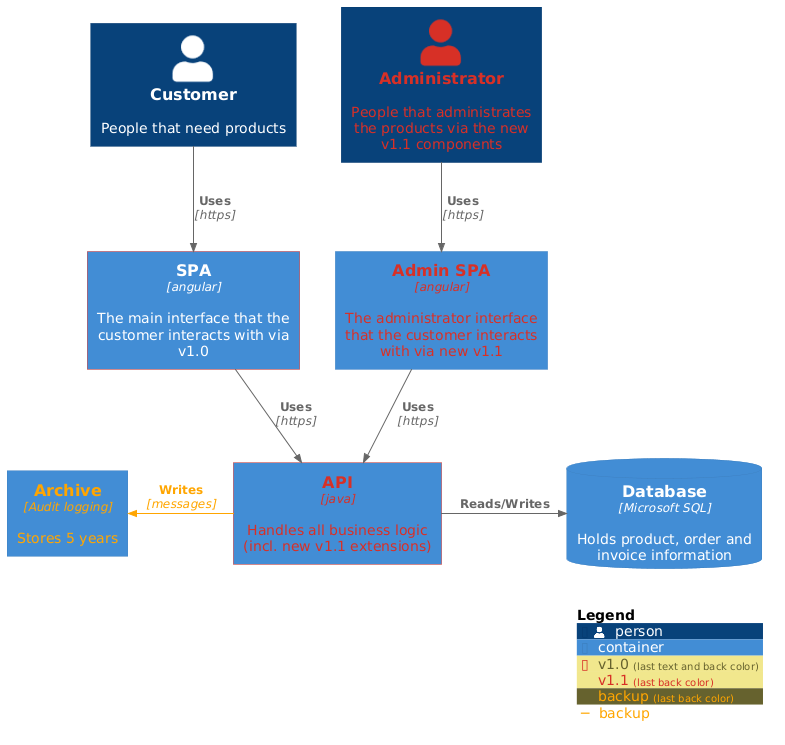
Elements and relations can be decorated with tags and explained via a calculated legend, for example:
|
|
|
|
|
|
```csharp
|
|
|
@startuml
|
|
|
!include https://raw.githubusercontent.com/plantuml-stdlib/C4-PlantUML/master/C4_Container.puml
|
|
|
|
|
|
AddElementTag("v1.0", $borderColor="#d73027")
|
|
|
AddElementTag("v1.1", $fontColor="#d73027")
|
|
|
AddElementTag("backup", $fontColor="orange")
|
|
|
|
|
|
AddRelTag("backup", $textColor="orange", $lineColor="orange")
|
|
|
|
|
|
Person(user, "Customer", "People that need products")
|
|
|
Person(admin, "Administrator", "People that administrates the products via the new v1.1 components", $tags="v1.1")
|
|
|
Container(spa, "SPA", "angular", "The main interface that the customer interacts with via v1.0", $tags="v1.0")
|
|
|
Container(spaAdmin, "Admin SPA", "angular", "The administrator interface that the customer interacts with via new v1.1", $tags="v1.1")
|
|
|
Container(api, "API", "java", "Handles all business logic (incl. new v1.1 extensions)", $tags="v1.0+v1.1")
|
|
|
ContainerDb(db, "Database", "Microsoft SQL", "Holds product, order and invoice information")
|
|
|
Container(archive, "Archive", "Audit logging", "Stores 5 years", $tags="backup")
|
|
|
|
|
|
Rel(user, spa, "Uses", "https")
|
|
|
Rel(spa, api, "Uses", "https")
|
|
|
Rel_R(api, db, "Reads/Writes")
|
|
|
Rel(admin, spaAdmin, "Uses", "https")
|
|
|
Rel(spaAdmin, api, "Uses", "https")
|
|
|
Rel_L(api, archive, "Writes", "messages", $tags="backup")
|
|
|
|
|
|
SHOW_LEGEND()
|
|
|
@enduml
|
|
|
```
|
|
|
|
|
|
|
|
|
|
|
|
|
|
|
## Supported Diagram Types
|
|
|
|
|
|
Diagram types
|
|
|
|
|
|
* System Context & System Landscape diagrams
|
|
|
* Import: `!include https://raw.githubusercontent.com/plantuml-stdlib/C4-PlantUML/master/C4_Context.puml`
|
|
|
* Macros:
|
|
|
* `Person(alias, label, ?description, ?sprite, ?tags)`
|
|
|
* `Person_Ext`
|
|
|
* `System(alias, label, ?description, ?sprite, ?tags)`
|
|
|
* `System_Ext`
|
|
|
* `Boundary(alias, label, ?type, ?tags)`
|
|
|
* `Enterprise_Boundary(alias, label, ?tags)`
|
|
|
* `System_Boundary`
|
|
|
* Container diagram
|
|
|
* Import: `!include https://raw.githubusercontent.com/plantuml-stdlib/C4-PlantUML/master/C4_Container.puml`
|
|
|
* Additional Macros:
|
|
|
* `Container(alias, label, technology, ?description, ?sprite, ?tags)`
|
|
|
* `ContainerDb`
|
|
|
* `ContainerQueue`
|
|
|
* `Container_Ext`
|
|
|
* `ContainerDb_Ext`
|
|
|
* `ContainerQueue_Ext`
|
|
|
* `Container_Boundary(alias, label)`
|
|
|
* Component diagram
|
|
|
* Import: `!include https://raw.githubusercontent.com/plantuml-stdlib/C4-PlantUML/master/C4_Component.puml`
|
|
|
* Additional Macros:
|
|
|
* `Component(alias, label, technology, ?description, ?sprite, ?tags)`
|
|
|
* `ComponentDb`
|
|
|
* `ComponentQueue`
|
|
|
* `Component_Ext`
|
|
|
* `ComponentDb_Ext`
|
|
|
* `ComponentQueue_Ext`
|
|
|
* Dynamic diagram
|
|
|
* Import: `!include https://raw.githubusercontent.com/plantuml-stdlib/C4-PlantUML/master/C4_Dynamic.puml`
|
|
|
* Additional Macros:
|
|
|
* `RelIndex(index, from, to, label)`
|
|
|
* (lowercase) `increment($offset=1)`: increase current index (procedure which has no direct output)
|
|
|
* (lowercase) `setIndex($new_index)`: set the new index (procedure which has no direct output)
|
|
|
* `LastIndex()`: return the last used index (function which can be used as argument)
|
|
|
|
|
|
following 2 macros requires V1.2020.24Beta4 (can be already tested with https://www.plantuml.com/plantuml/)
|
|
|
* `Index($offset=1)`: returns current index and calculates next index (function which can be used as argument)
|
|
|
* `SetIndex($new_index)`: returns new set index and calculates next index (function which can be used as argument)
|
|
|
|
|
|
* Deployment diagram
|
|
|
* Import: `!include https://raw.githubusercontent.com/plantuml-stdlib/C4-PlantUML/master/C4_Deployment.puml`
|
|
|
* Additional Macros:
|
|
|
* `Deployment_Node(alias, label, ?type, ?description, ?sprite, ?tags)`
|
|
|
* `Node(alias, label, ?type, ?description, ?sprite, ?tags)`: short name of Deployment_Node()
|
|
|
* `Node_L(alias, label, ?type, ?description, ?sprite, ?tags)`: left aligned Node()
|
|
|
* `Node_R(alias, label, ?type, ?description, ?sprite, ?tags)`: right aligned Node()
|
|
|
|
|
|
Take a look at each of the [C4 Model Diagram Samples](samples/C4CoreDiagrams.md).
|
|
|
|
|
|
## Relationship Types
|
|
|
|
|
|
* `Rel(from, to, label, ?technology, ?description, ?sprite, ?tags)`
|
|
|
* `BiRel` (bidirectional relationship)
|
|
|
|
|
|
You can force the direction of a relationship by using:
|
|
|
|
|
|
* `Rel_U`, `Rel_Up`
|
|
|
* `Rel_D`, `Rel_Down`
|
|
|
* `Rel_L`, `Rel_Left`
|
|
|
* `Rel_R`, `Rel_Right`
|
|
|
|
|
|
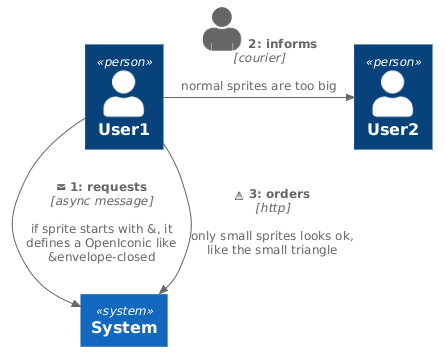
Relationship specific sprites are not down scaled, they requires typically smaller icons.
|
|
|
Therefore if sprite argument starts with `&` an OpenIconic name can be used too (details see https://useiconic.com/open)
|
|
|
|
|
|
```csharp
|
|
|
@startuml
|
|
|
!include https://raw.githubusercontent.com/plantuml-stdlib/C4-PlantUML/master/C4_Dynamic.puml
|
|
|
|
|
|
Person(user, "User1")
|
|
|
Person(user2, "User2")
|
|
|
System(system, "System")
|
|
|
|
|
|
' if sprite starts with &, sprite defines a OpenIconic, details see https://useiconic.com/open/
|
|
|
Rel_D(user, system, "requests", "async message", "if sprite starts with &, it defines a OpenIconic like &envelope-closed", $sprite = "&envelope-closed")
|
|
|
|
|
|
' normal sprites are too big
|
|
|
Rel_R(user, user2, "informs", "courier", "normal sprites are too big", "person2")
|
|
|
|
|
|
' special smaller sprites have to be used
|
|
|
sprite $triangle {
|
|
|
00000000000
|
|
|
00000F00000
|
|
|
0000FBF0000
|
|
|
0000FBF0000
|
|
|
000F999F000
|
|
|
000F999F000
|
|
|
00F66666F00
|
|
|
00F66666F00
|
|
|
0F3333333F0
|
|
|
0F3333333F0
|
|
|
0FFFFFFFFF0
|
|
|
00000000000
|
|
|
}
|
|
|
Rel(user, system, "orders", "http", "only small sprites looks ok, like the small triangle", "triangle")
|
|
|
@enduml
|
|
|
```
|
|
|
|
|
|
|
|
|
|
|
|
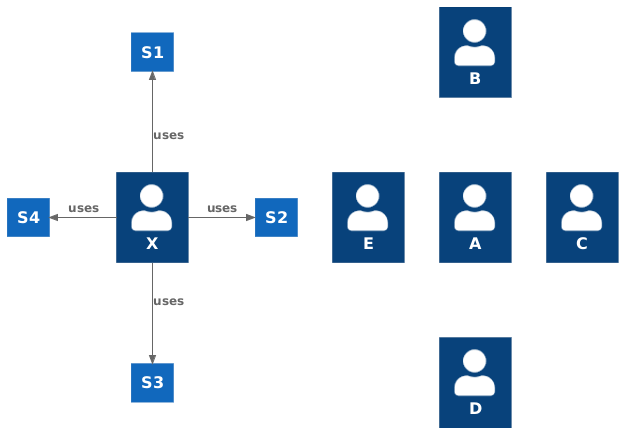
In rare cases, you can force the layout of objects which have no relationships by using:
|
|
|
|
|
|
* `Lay_U`
|
|
|
* `Lay_D`
|
|
|
* `Lay_L`
|
|
|
* `Lay_R`
|
|
|
|
|
|
In following sample a person uses different systems, and group of persons which have no relations
|
|
|
|
|
|
```csharp
|
|
|
@startuml
|
|
|
!include https://raw.githubusercontent.com/plantuml-stdlib/C4-PlantUML/master/C4_Container.puml
|
|
|
HIDE_STEREOTYPE()
|
|
|
|
|
|
Person(a, "A")
|
|
|
Person(b, "B")
|
|
|
Person(c, "C")
|
|
|
Person(d, "D")
|
|
|
Person(e, "E")
|
|
|
|
|
|
Lay_U(a, b)
|
|
|
Lay_R(a, c)
|
|
|
Lay_D(a, d)
|
|
|
Lay_L(a, e)
|
|
|
|
|
|
Person(x, "X")
|
|
|
System(s1, "S1")
|
|
|
System(s2, "S2")
|
|
|
System(s3, "S3")
|
|
|
System(s4, "S4")
|
|
|
|
|
|
Rel_U(x, s1, "uses")
|
|
|
Rel_R(x, s2, "uses")
|
|
|
Rel_D(x, s3, "uses")
|
|
|
Rel_L(x, s4, "uses")
|
|
|
@enduml
|
|
|
```
|
|
|
|
|
|
|
|
|
|
|
|
## Layout Options
|
|
|
|
|
|
C4-PlantUML also comes with some layout options to make it easy and reusable to create nice and useful diagrams:
|
|
|
|
|
|
* [LAYOUT_TOP_DOWN() or LAYOUT_LEFT_RIGHT()](LayoutOptions.md#layout_top_down-or-layout_left_right)
|
|
|
* [LAYOUT_WITH_LEGEND() or SHOW_LEGEND(?hideStereotype)](LayoutOptions.md#layout_with_legend-or-SHOW_LEGEND)
|
|
|
* [LAYOUT_AS_SKETCH()](LayoutOptions.md#layout_as_sketch)
|
|
|
* [HIDE_STEREOTYPE()](LayoutOptions.md#hide_stereotype)
|
|
|
|
|
|
C4-PlantUML also comes with some default person sprite options:
|
|
|
|
|
|
* [HIDE_PERSON_SPRITE()](LayoutOptions.md#hide_person_sprite)
|
|
|
* [SHOW_PERSON_SPRITE(?sprite)](LayoutOptions.md#show_person_sprite)
|
|
|
|
|
|
## Custom tags/stereotypes support and skinparam updates
|
|
|
|
|
|
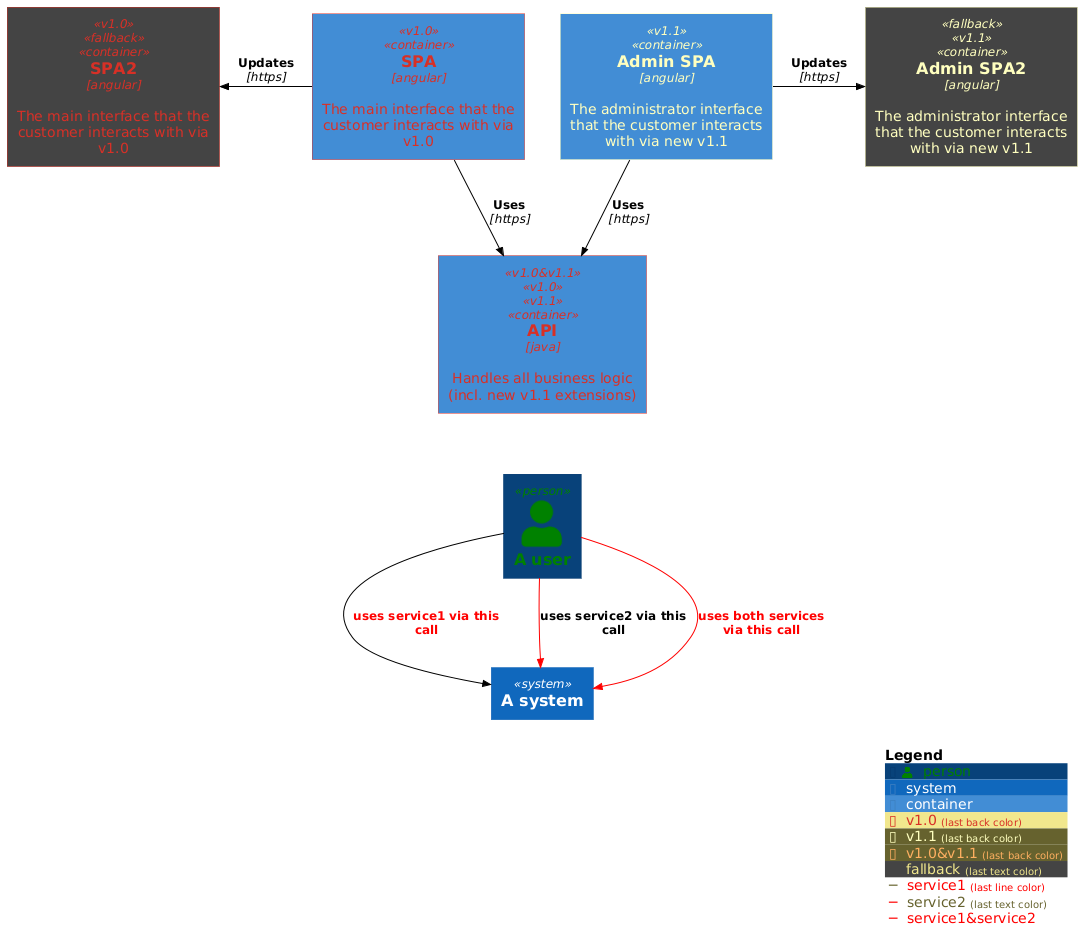
Additional tags/stereotypes can be added to the existing element stereotypes (component, ...) and highlight,... specific aspects:
|
|
|
|
|
|
* `AddElementTag(tagStereo, ?bgColor, ?fontColor, ?borderColor, ?shadowing)`:
|
|
|
Introduces a new element tag. The styles of the tagged elements are updated and the tag is displayed in the calculated legend.
|
|
|
* `AddRelTag(tagStereo, ?textColor, ?lineColor)`:
|
|
|
Introduces a new relation tag. The styles of the tagged relations are updated and the tag is displayed in the calculated legend.
|
|
|
|
|
|
* `UpdateElementStyle(elementName, ?bgColor, ?fontColor, ?borderColor, ?shadowing)`
|
|
|
This call updates the default style of the elements (component, ...) and creates no additional legend entry.
|
|
|
* `UpdateRelStyle(textColor, lineColor)`
|
|
|
This call updates the default relationship colors and creates no additional legend entry.
|
|
|
|
|
|
Each element can be extended with one or multiple custom tags via the keyword argument `$tags="..."`, like `Container(spaAdmin, "Admin SPA", $tags="v1.1")`.
|
|
|
Multiple tags can be combined with `+`, like `Container(api, "API", $tags="v1.0+v1.1")`.
|
|
|
|
|
|
**Comments**
|
|
|
|
|
|
* `SHOW_LEGEND()` supports the customized stereotypes
|
|
|
(`LAYOUT_WITH_LEGEND()` cannot be used, if the custom tags/stereotypes should be displayed in the legend).
|
|
|
* `SHOW_LEGEND()` has to be last line in diagram.
|
|
|
* Don't use space between `$tags` and `=` (PlantUML does not support it).
|
|
|
* Don't use `,` as part of the tag names (PlantUML does not support it in combination with keyword arguments).
|
|
|
* If 2 tags defines the same skinparam, the first definition is used.
|
|
|
* If specific skinparams have to be merged (e.g. 2 tags change the font color) an additional combined tag has to be defined. Use `&` as part of combined tag names.
|
|
|
|
|
|
* Colors of relationship tags cannot be automatically merged (PlantUML does not support it).
|
|
|
If one tag modifies the line color and the other the text color, an additional combined tag has to be defined and used.
|
|
|
|
|
|
```csharp
|
|
|
@startuml
|
|
|
!include https://raw.githubusercontent.com/plantuml-stdlib/C4-PlantUML/master/C4_Container.puml
|
|
|
|
|
|
UpdateElementStyle(person, $fontColor="green")
|
|
|
AddElementTag("v1.0", $fontColor="#d73027", $borderColor="#d73027")
|
|
|
AddElementTag("v1.1", $fontColor="#ffffbf", $borderColor="#ffffbf")
|
|
|
AddElementTag("v1.0&v1.1", $fontColor="#fdae61", $borderColor="#fdae61")
|
|
|
AddElementTag("fallback", $bgColor="#444444")
|
|
|
|
|
|
UpdateRelStyle(black, black)
|
|
|
AddRelTag("service1", $textColor="red")
|
|
|
AddRelTag("service2", $lineColor="red")
|
|
|
AddRelTag("service1&service2", $textColor="red", $lineColor="red")
|
|
|
|
|
|
Container(spa, "SPA", "angular", "The main interface that the customer interacts with via v1.0", $tags="v1.0")
|
|
|
Container(spaAdmin, "Admin SPA", "angular", "The administrator interface that the customer interacts with via new v1.1", $tags="v1.1")
|
|
|
Container(api, "API", "java", "Handles all business logic (incl. new v1.1 extensions)", $tags="v1.0&v1.1+v1.0+v1.1")
|
|
|
Container(spa2, "SPA2", "angular", "The main interface that the customer interacts with via v1.0", $tags="v1.0+fallback")
|
|
|
Container(spaAdmin2, "Admin SPA2", "angular", "The administrator interface that the customer interacts with via new v1.1", $tags="fallback+v1.1")
|
|
|
|
|
|
Rel(spa, api, "Uses", "https")
|
|
|
Rel(spaAdmin, api, "Uses", "https")
|
|
|
Rel_L(spa, spa2, "Updates", "https")
|
|
|
Rel_R(spaAdmin, spaAdmin2, "Updates", "https")
|
|
|
|
|
|
Person(user, "A user")
|
|
|
System(system, "A system")
|
|
|
|
|
|
Rel_D(user, system, "uses service1 via this call", $tags="service1")
|
|
|
Rel_D(user, system, "uses service2 via this call", $tags="service2")
|
|
|
Rel_D(user, system, "uses both services via this call", $tags="service1&service2+service1+service2")
|
|
|
|
|
|
Lay_D(api, user)
|
|
|
SHOW_LEGEND(false)
|
|
|
@enduml
|
|
|
```
|
|
|
|
|
|
|
|
|
|
|
|
**Custom schema definition**
|
|
|
|
|
|
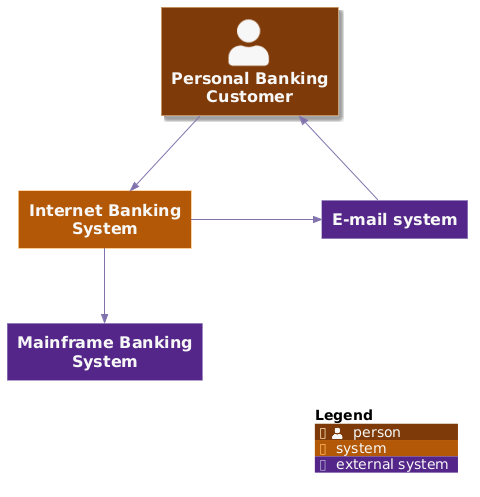
If the custom (color) schema is defined via `UpdateElementStyle()` then the legend of existing elements is updated too.
|
|
|
|
|
|
```csharp
|
|
|
@startuml
|
|
|
!include https://raw.githubusercontent.com/plantuml-stdlib/C4-PlantUML/master/C4_Context.puml
|
|
|
|
|
|
!$COLOR_A_5 = "#7f3b08"
|
|
|
!$COLOR_A_4 = "#b35806"
|
|
|
!$COLOR_A_3 = "#e08214"
|
|
|
!$COLOR_A_2 = "#fdb863"
|
|
|
!$COLOR_A_1 = "#fee0b6"
|
|
|
!$COLOR_NEUTRAL = "#f7f7f7"
|
|
|
!$COLOR_B_1 = "#d8daeb"
|
|
|
!$COLOR_B_2 = "#b2abd2"
|
|
|
!$COLOR_B_3 = "#8073ac"
|
|
|
!$COLOR_B_4 = "#542788"
|
|
|
!$COLOR_B_5 = "#2d004b"
|
|
|
!$COLOR_REL_LINE = "#8073ac"
|
|
|
!$COLOR_REL_TEXT = "#8073ac"
|
|
|
|
|
|
UpdateElementStyle("person", $bgColor=$COLOR_A_5, $fontColor=$COLOR_NEUTRAL, $borderColor=$COLOR_A_1, $shadowing="true")
|
|
|
UpdateElementStyle("external_person", $bgColor=$COLOR_B_5, $fontColor=$COLOR_NEUTRAL, $borderColor=$COLOR_B_1)
|
|
|
UpdateElementStyle("system", $bgColor=$COLOR_A_4, $fontColor=$COLOR_NEUTRAL, $borderColor=$COLOR_A_2)
|
|
|
UpdateElementStyle("external_system", $bgColor=$COLOR_B_4, $fontColor=$COLOR_NEUTRAL, $borderColor=$COLOR_B_2)
|
|
|
UpdateRelStyle($lineColor=$COLOR_REL_LINE, &textColor=$COLOR_REL_TEXT)
|
|
|
|
|
|
Person(customer, "Personal Banking Customer")
|
|
|
System(banking_system, "Internet Banking System")
|
|
|
|
|
|
System_Ext(mail_system, "E-mail system")
|
|
|
System_Ext(mainframe, "Mainframe Banking System")
|
|
|
|
|
|
Rel(customer, banking_system, "Uses")
|
|
|
Rel_Back(customer, mail_system, "Sends e-mails to")
|
|
|
Rel_Neighbor(banking_system, mail_system, "Sends e-mails")
|
|
|
Rel(banking_system, mainframe, "Uses")
|
|
|
|
|
|
SHOW_LEGEND()
|
|
|
@enduml
|
|
|
```
|
|
|
|
|
|
|
|
|
|
|
|
## Element properties
|
|
|
|
|
|
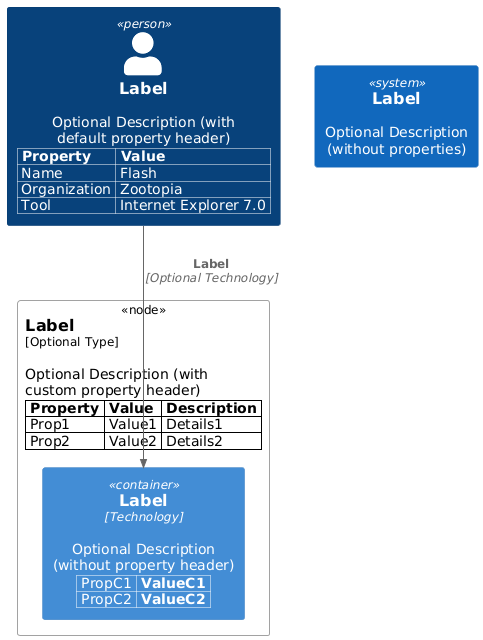
A model can be extended with (a table of) properties that concrete deployments or more detailed concepts can be documented:
|
|
|
|
|
|
* `SetPropertyHeader(col1Name, col2Name, ?col3Name, ?col4Name)`:
|
|
|
The properties table can have up to 4 columns. The default header uses the column names "Name", "Description".
|
|
|
* `WithoutPropertyHeader()`
|
|
|
If no header is used, then the second column is bold.
|
|
|
* `AddProperty(col1, col2, ?col3, `?col4)`
|
|
|
(All columns of) a property which will be added to the next element.
|
|
|
|
|
|
Following sample uses all 3 different property definitions (and the aligned deployment node).
|
|
|
|
|
|
```csharp
|
|
|
@startuml
|
|
|
!include https://raw.githubusercontent.com/plantuml-stdlib/C4-PlantUML/master/C4_Deployment.puml
|
|
|
|
|
|
' default header Property, Value
|
|
|
AddProperty("Name", "Flash")
|
|
|
AddProperty("Organization", "Zootopia")
|
|
|
AddProperty("Tool", "Internet Explorer 7.0")
|
|
|
Person(personAlias, "Label", "Optional Description (with default property header)")
|
|
|
|
|
|
SetPropertyHeader("Property","Value", "Description")
|
|
|
AddProperty("Prop1", "Value1", "Details1")
|
|
|
AddProperty("Prop2", "Value2", "Details2")
|
|
|
Deployment_Node_L(nodeAlias, "Label", "Optional Type", "Optional Description (with custom property header)") {
|
|
|
|
|
|
WithoutPropertyHeader()
|
|
|
AddProperty("PropC1", "ValueC1")
|
|
|
AddProperty("PropC2", "ValueC2")
|
|
|
Container(containerAlias, "Label", "Technology", "Optional Description (without property header)")
|
|
|
}
|
|
|
|
|
|
System(systemAlias, "Label", "Optional Description (without properties)")
|
|
|
|
|
|
Rel(personAlias, containerAlias, "Label", "Optional Technology")
|
|
|
@enduml
|
|
|
```
|
|
|
|
|
|
|
|
|
|
|
|
## Snippets for Visual Studio Code
|
|
|
|
|
|
Because the PlantUML support inside of Visual Studio Code is excellent with the [PlantUML extension](https://marketplace.visualstudio.com/items?itemName=jebbs.plantuml), you can also find VS Code snippets for C4-PlantUML at [.vscode/C4.code-snippets](.vscode/C4.code-snippets).
|
|
|
|
|
|
Project level snippets are now supported in [VSCode 1.28](https://code.visualstudio.com/updates/v1_28#_project-level-snippets).
|
|
|
Just include the `C4.code-snippets` file in the `.vscode` folder of your project.
|
|
|
|
|
|
It is possible to save them directly inside VS Code: [Creating your own snippets](https://code.visualstudio.com/docs/editor/userdefinedsnippets#_creating-your-own-snippets).
|
|
|
|
|
|

|
|
|
|
|
|
## Advanced Samples
|
|
|
|
|
|
The following advanced samples are reproductions with C4-PlantUML from official [C4 model samples](https://c4model.com/#examples) created by [Simon Brown](https://simonbrown.je/).
|
|
|
|
|
|
The core diagram samples from [c4model.com](https://c4model.com/#coreDiagrams) are available [here](samples/C4CoreDiagrams.md).
|
|
|
|
|
|
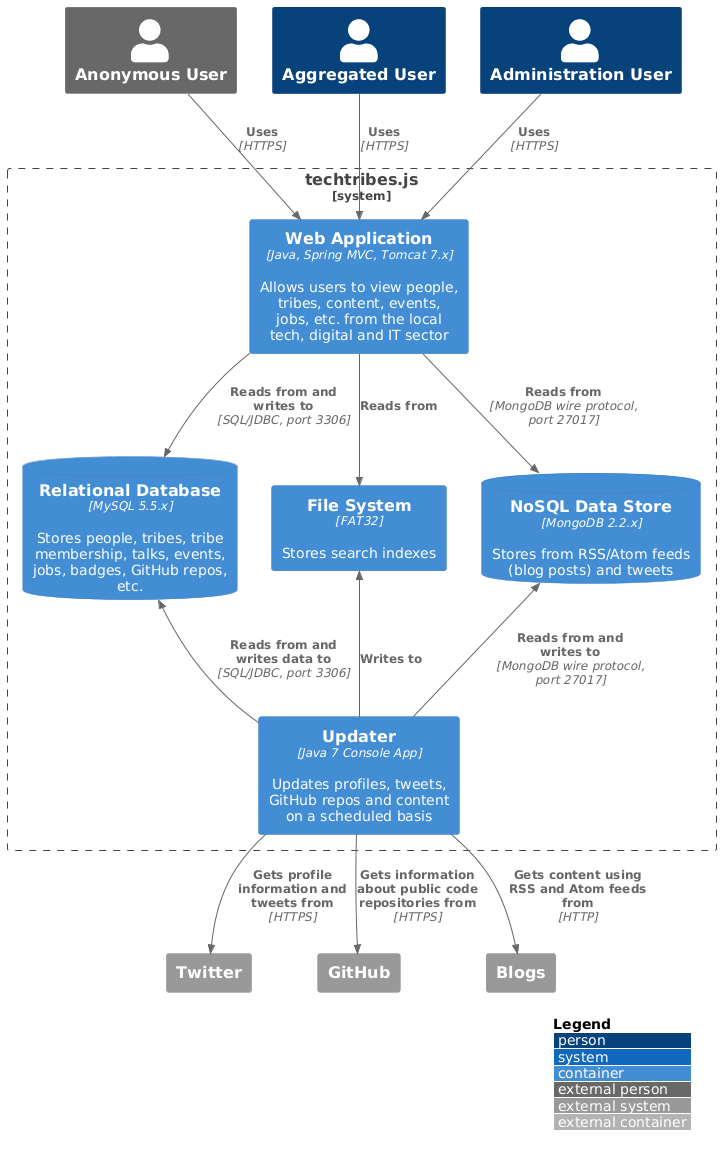
### techtribes.js
|
|
|
|
|
|
Source: [C4_Container Diagram Sample - techtribesjs.puml](samples/C4_Container%20Diagram%20Sample%20-%20techtribesjs.puml)
|
|
|
|
|
|
|
|
|
|
|
|
|
|
|
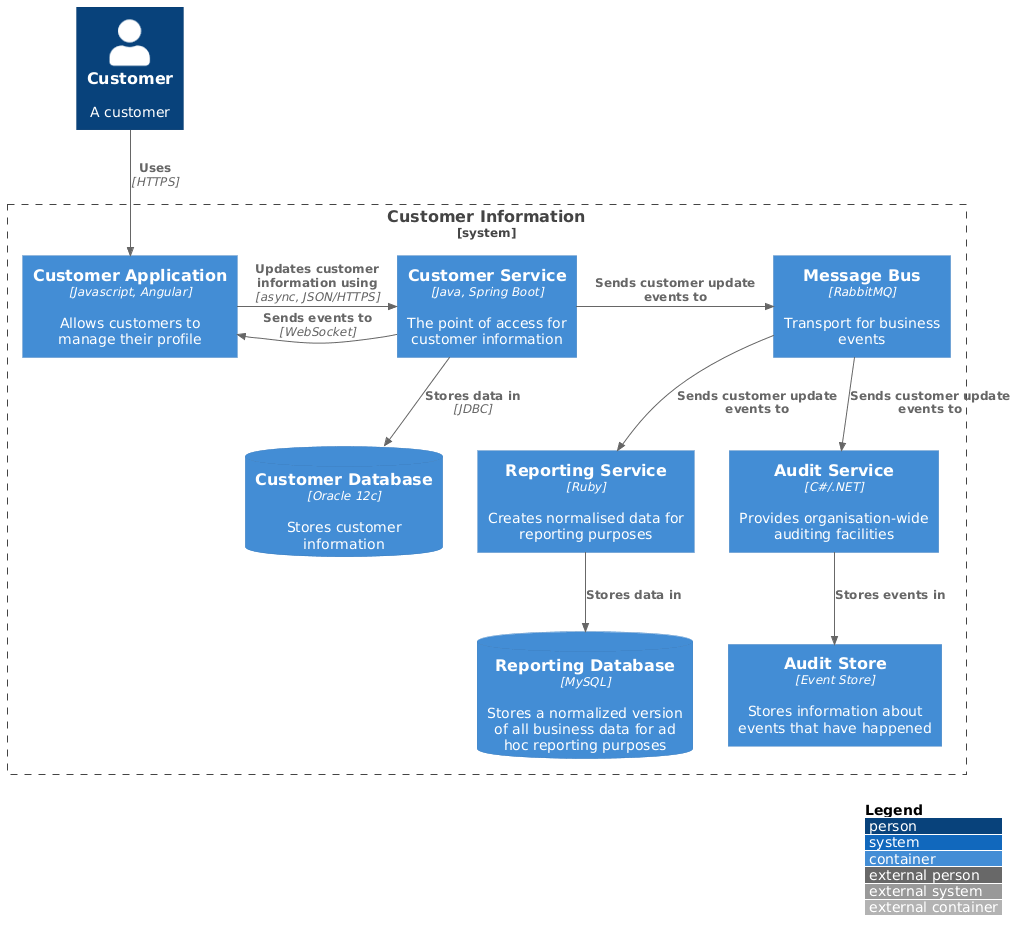
### Message Bus and Microservices
|
|
|
|
|
|
Source: [C4_Container Diagram Sample - message bus.puml](samples/C4_Container%20Diagram%20Sample%20-%20message%20bus.puml)
|
|
|
|
|
|
|
|
|
|
|
|
|
|
|
## Background
|
|
|
|
|
|
[PlantUML](https://plantuml.com/) is an open source project that allows you to create UML diagrams.
|
|
|
Diagrams are defined using a simple and intuitive language.
|
|
|
Images can be generated in PNG, in SVG or in LaTeX format.
|
|
|
|
|
|
PlantUML was created to allow the drawing of UML diagrams, using a simple and human readable text description.
|
|
|
Because it does not prevent you from drawing inconsistent diagrams, it is a drawing tool and not a modeling tool.
|
|
|
It is the most used text-based diagram drawing tool with [extensive support into wikis and forums, text editors and IDEs, use by different programming languages and documentation generators](https://plantuml.com/running).
|
|
|
|
|
|
The [C4 model](https://c4model.com/) for software architecture is an "abstraction-first" approach to diagramming, based upon abstractions that reflect how software architects and developers think about and build software.
|
|
|
The small set of abstractions and diagram types makes the C4 model easy to learn and use.
|
|
|
C4 stands for context, containers, components, and code — a set of hierarchical diagrams that you can use to describe your software architecture at different zoom levels, each useful for different audiences.
|
|
|
|
|
|
The C4 model was created as a way to help software development teams describe and communicate software architecture, both during up-front design sessions and when retrospectively documenting an existing codebase.
|
|
|
|
|
|
More information can be found here:
|
|
|
|
|
|
* [The C4 model for software architecture](https://c4model.com/)
|
|
|
* [REAL WORLD PlantUML - Sample Gallery](https://real-world-plantuml.com/)
|
|
|
* [Visualising and documenting software architecture cheat sheets](https://www.codingthearchitecture.com/2017/04/27/visualising_and_documenting_software_architecture_cheat_sheets.html)
|
|
|
* [PlantUML and Structurizr - Create models not diagrams](https://www.codingthearchitecture.com/2016/12/08/plantuml_and_structurizr.html)
|
|
|
|
|
|
## License
|
|
|
|
|
|
This project is licensed under the MIT License - see the [LICENSE](LICENSE) file for details
|